AI Business Photo Generator: How to Choose Professional Headshots That Feel Like You

A polished headshot can still be the wrong headshot if it doesn’t look like you. That’s the real test of an AI business photo generator: whether the result feels recognisable, credible, and right for the work you do.
It’s reasonable to be cautious. Free tools, paid services, and large galleries of generated images can make quality hard to judge. A photo that looks smooth on screen may feel artificial on LinkedIn, where colleagues, clients, or recruiters expect to see you as you are.
This guide explains how to assess natural likeness, professional fit, useful variety, and the trade-offs between generated images and a traditional photoshoot. You’ll learn what to look for in the photos, not just the tool’s claims. CMeIn creates AI-generated professional LinkedIn headshots for people who want a business photo without arranging a studio session. The aim is to find a professional image that still feels like you.
Key Takeaways
- An AI business photo generator can change how a portrait is presented, but it can’t change your qualifications or professional identity.
- Compare source-photo requirements, privacy details, workflow, and the range of useful choices, not just advertised image counts.
- Check familiar facial details across several images. A polished look is no substitute for a recognisable face.
- Use a simple process: define where the photo will appear, prepare source photos, generate options, review them, and choose the one that fits.
- CMeIn creates professional LinkedIn headshots as an alternative to arranging a traditional corporate photoshoot.
Table of Contents
- What an AI business photo generator can, and cannot, do for your professional image
- How to compare AI business photo generators before choosing one
- Will an AI business photo still look like you and feel credible?
- A practical process for choosing and reviewing professional AI headshots
- Choose CMeIn for AI LinkedIn headshots without a traditional photoshoot
What an AI business photo generator can, and cannot, do for your professional image
An AI business photo generator uses photos you provide to create new portraits with a professional presentation. The result may place you in a different setting, outfit, pose, or lighting arrangement from the source images. It can help you create a business-style portrait without scheduling a studio session, but the image is still a representation of you, not evidence of your work or credentials.
A useful definition: An AI business photo generator creates a new professional-style portrait from your submitted photos, while photo editing adjusts an existing image. That distinction matters. Artificial intelligence (AI) can generate new visual content, but the output still needs human judgment before you use it professionally.
Business portraits commonly appear on LinkedIn profiles, resumes, and company websites. Each setting has a different audience, but the basic purpose is similar: help people recognise who they’re looking at. A generated headshot can change the image’s presentation. It can’t change your qualifications, experience, or professional identity, and it can’t guarantee a stronger profile or better career results.
How AI-generated professional headshots differ from ordinary photo editing
Ordinary editing starts with an existing headshot and adjusts that image. Changes might include cropping it to fit a profile shape, correcting colour, or cleaning up the background. Generation works differently: software uses submitted photos as reference material to create a new portrait, rather than simply making small adjustments to one original frame.
That gives you a different kind of choice, not an automatic improvement. A new background or formal outfit may suit a professional setting, but the generated result can also depart from the source photos. Treat it as a portrait to review, not a corrected version of reality.
When a generated business photo may fit your needs
A generated image may suit you if you need a professional profile photo but would rather not arrange a traditional photoshoot. For example, you might want a consistent headshot for LinkedIn or a resume, while your available photos are casual, poorly lit, or set against a distracting background. A generator offers another route to a business-style image.
Consider the intended use before choosing a style. A headshot for a personal LinkedIn profile may call for a different feel from a portrait on a company website. In either case, the result should remain recognisable and fit the setting. If the styling looks polished but the face feels unfamiliar, the photo isn’t doing its job.
A generated portrait can help with presentation, but it can’t decide what feels appropriate for your work. Look for an image that feels like a plausible professional photo of you, rather than a version built to match an ideal.
How to compare AI business photo generators before choosing one
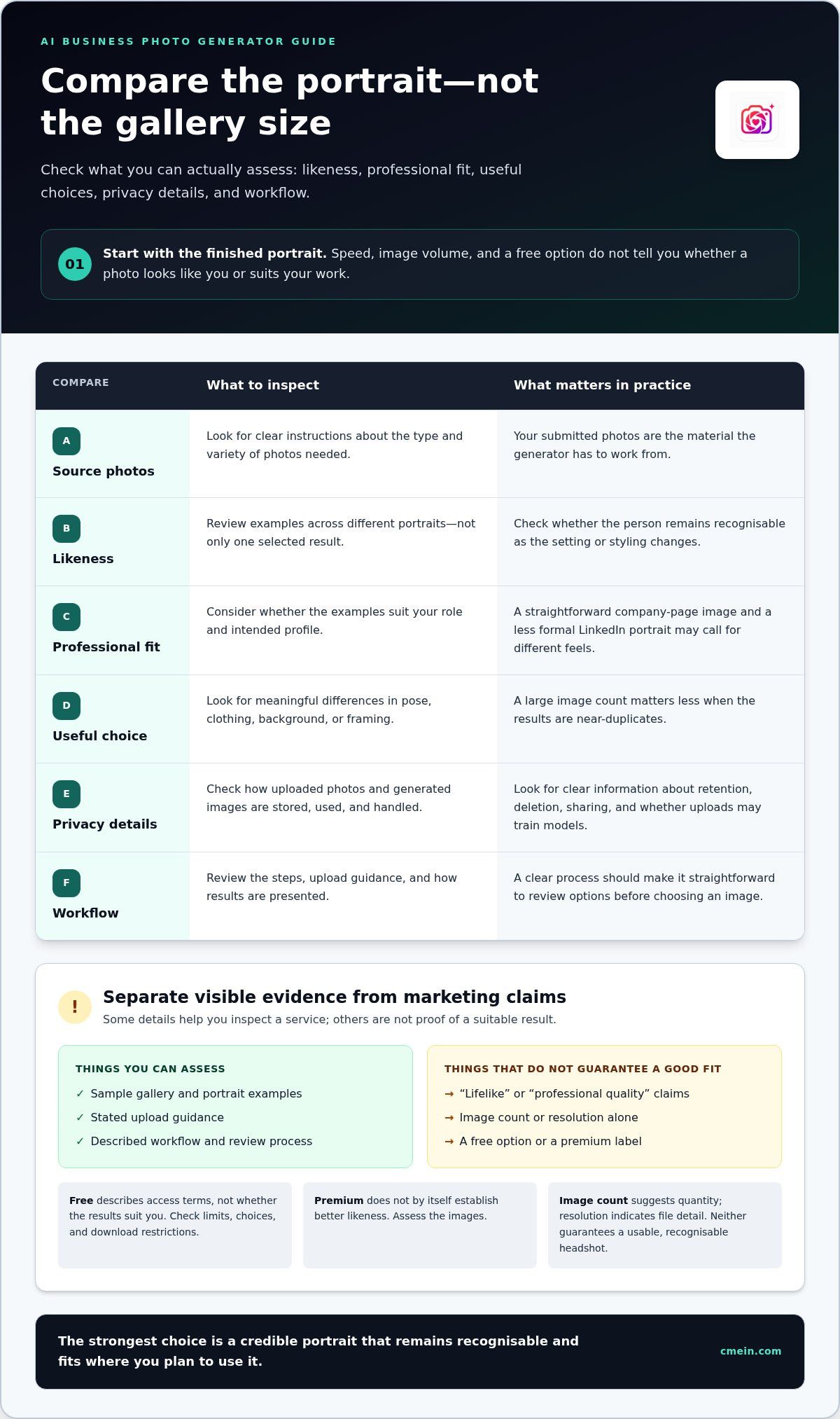
Start with the finished portrait, not the size of the gallery. An AI business photo generator may advertise speed, image volume, or a free option, but those details don’t tell you whether the photos look like you or suit your work. Compare the results you can inspect with the information the service clearly explains.
| What to compare | What to look for |
|---|---|
| Source-photo requirements | Clear instructions on the type and variety of photos needed. These determine what the tool has to work from. |
| Likeness | Examples that let you assess whether the person remains recognisable across different portraits, not just in one selected result. |
| Professional context | Looks that suit your role and intended profile, such as a straightforward image for a company page or a less formal LinkedIn portrait. |
| Choice | Meaningful differences in pose, clothing, background, or framing. A large image count matters less if the results are near-duplicates. |
| Privacy information | Plain explanations of how uploaded photos and generated images are stored, used, and handled, including whether uploads may be used to train models. |
| Workflow | Understandable steps, clear upload guidance, and a straightforward way to review results before choosing an image. |
Which features matter most in a professional AI headshot tool?
Start by checking likeness across the available examples. Does the face stay consistent when the setting or styling changes? Then consider professional fit: a formal look may suit one role, while a more relaxed portrait may feel right for another. Look for distinct, useful choices rather than a pile of small variations. Natural proportions and a credible expression matter more than studio-style polish alone.
Separate visible features from promises. A sample gallery, stated upload guidance, and described workflow are things you can assess. Claims such as “lifelike” or “professional quality” are judgments, not proof. Image count and resolution can indicate quantity or file detail, but neither guarantees a usable, recognisable headshot.
How to read free, premium, and privacy claims
“Free” describes the access terms, not whether the results suit your needs. Check what the option includes, such as generation limits, available choices, or download restrictions, and compare those terms with paid options. Don’t assume a premium label means better likeness. Look at the images and assess how clear the workflow is.
Read the privacy information before uploading personal photos. Look for specific explanations of retention, deletion, sharing, and model training. If the terms are vague, treat that as a meaningful gap in your comparison rather than a detail to overlook.
For LinkedIn-ready portraits without arranging a corporate photoshoot, CMeIn’s AI professional headshots are designed to maintain natural likeness and credibility. Apply the same test to any result: choose a photo that looks recognisably like you and fits the profile where it will appear.
Will an AI business photo still look like you and feel credible?
It can, but polished styling alone isn’t enough. If the face feels unfamiliar, a sharp jacket and studio-style background won’t make the portrait credible. An AI business photo generator can create options without a studio appointment, but you still need to judge whether each result looks like the person who will use it.
A credible AI headshot is recognisable, appropriate to its professional context, and unexaggerated. Judge the whole impression, not just whether the image resembles you at first glance. Small changes to familiar features can make a photo feel wrong even when the overall face seems close.
Signs that a generated headshot still looks like you
Compare each result with recent photos of yourself, ideally ones taken in ordinary lighting. Check details individually instead of asking only, “Does this look like me?” Look for consistency across several generated portraits. One convincing image can hide changes that become obvious elsewhere in the set.
- Facial proportions: Check the spacing and shape of your eyes, nose, mouth, and jaw against familiar photos.
- Hairline and hair: Notice whether the hairline, part, texture, and general shape still look like yours.
- Skin tone and texture: Look for a tone that feels consistent with your appearance, rather than one shifted by overly smooth or artificial styling.
- Expression: Ask whether the expression feels plausible for you. A forced smile or unusually intense gaze can make a familiar face seem unlike itself.
Pay attention to details that change between images. If your facial shape shifts from one portrait to the next, or a distinctive feature appears differently, don’t dismiss it because one result looks especially polished. Choose a consistent image over a striking outlier.
When a polished image starts to feel misleading
A headshot can cross the line from flattering to unfamiliar if it makes you look noticeably younger, changes your face shape, or alters another feature people know. Consider the likely first impression in context: would a colleague, client, or recruiter recognise you from the profile photo when meeting you? If the difference would surprise them, the image may not be a good choice.
Check the styling, too. Formal clothing, a corporate-looking background, or a confident expression can suggest a setting that doesn’t match your actual role or professional environment. The goal isn’t to document every detail of daily life, but the portrait should feel plausible rather than like a character you’re playing.
- Set the generated image beside a recent photo and compare the visible features, not just the overall mood.
- Review more than one result to spot details that shift between images.
- Ask someone who knows your face whether they’d recognise you without prompting.
AI can save you from arranging a studio session, but it can’t make the final call. If a photo looks impressive but unlike its subject, choose the believable one instead.
A practical process for choosing and reviewing professional AI headshots
Generating portraits is only part of the job. A simple review process helps you choose an image that fits where you’ll use it instead of defaulting to the most polished result. Follow these five steps, from defining the purpose to making the final choice.
- Define the use. Decide where the headshot will appear: LinkedIn, a resume, or a company website. Consider who will see it and what tone fits your work. If you plan to use the same image in several places, make sure it feels suitable in each setting.
- Prepare source photos. Use recent pictures where your face is clear and unobstructed. Follow the generator’s upload guidance, but don’t assume any particular selfie guarantees a particular result.
- Generate options. Provide the requested photos and choose a visual direction that makes sense for your professional context. Treat the results as candidates, not finished decisions. The AI business photo generator can offer new presentations, but you decide which one represents you well.
- Review the candidates. Compare each portrait with current photos of yourself. Check that your face and expression feel familiar, then assess the setting, clothing, and overall tone. Set aside images that seem inconsistent, overly stylised, or difficult to recognise.
- Choose for the destination. Compare the remaining options at the size and in the context where they’ll appear. Consider whether the crop works for a LinkedIn profile, whether the image feels appropriate beside a resume, and whether it suits the company website’s tone. If one photo must serve all three, favour a clear, adaptable portrait over a highly specific look.
Prepare source photos and choose the professional context
Decide the destination before settling on a style. A company website may call for a look that sits comfortably alongside team portraits, while a personal profile may allow more room for individual expression. Keep the source images recent and clear, with your face visible. Better inputs give the tool more useful reference material, but they can’t guarantee that every generated portrait will be a good match.
Review candidates before using a generated headshot
Make a shortlist, then compare the images with your intended use in mind. A portrait might feel right for LinkedIn but too formal or too stylised beside your resume. Check both the face and the setting. If the expression feels unlike you, the backdrop distracts, or the image creates a different impression from your professional presence, remove it from consideration.
Keep the final test simple: would this photo feel natural beside your name and work? CMeIn creates AI-generated professional LinkedIn headshots as an alternative to arranging a traditional corporate photoshoot. Explore professional AI headshots to create profile options and review them at your own pace.
Choose CMeIn for AI LinkedIn headshots without a traditional photoshoot
A professional headshot doesn’t have to involve a studio appointment if that doesn’t fit your schedule or needs. CMeIn creates AI-generated professional headshots for LinkedIn as an alternative to arranging a traditional corporate photoshoot. The aim is a professional image that feels recognisable and credible, not a portrait that makes you look like someone else.
What CMeIn’s professional AI headshots are designed to help with
CMeIn’s service is for professionals who want a business-ready portrait for a profile such as LinkedIn, without organising an in-person studio session. It offers another route to a professional presentation: create AI-generated headshots, then choose an image that suits your profile and still feels like you.
A professional-looking image can support a consistent profile, but it can’t speak for your experience or guarantee how others will respond. The right choice depends on fit. Look for a portrait that feels appropriate to your role, is recognisable to people who know you, and presents you without exaggerated styling.
If you’re comparing an AI business photo generator with a traditional photoshoot, consider what you need from the process. A studio session involves arranging a photographer and a time to take pictures. CMeIn provides an AI-generated alternative for professionals seeking a LinkedIn headshot without that appointment. Either way, your final image should reflect how you want to present yourself at work while staying grounded in your actual appearance.
Take the next step toward a professional profile photo
Focus your decision on four things: likeness, so the portrait feels like you; context, so its style fits where it will appear; credibility, so it doesn’t feel overly altered; and useful choice, so you can select an image that works for your profile. These criteria matter more than a dramatic look or an impressive promise.
A good professional headshot doesn’t need to be unusually polished. It needs to feel believable beside your name and work. Review the available options with that standard in mind, and set aside any image that misses it, even if the styling looks sharp.
If you want a generated LinkedIn headshot without arranging a traditional photoshoot, Explore CMeIn AI professional headshots.
Choose a headshot that still feels like you
Your profile photo is one small part of how you present yourself, but it should feel consistent with the person people meet. Before choosing an AI business photo generator, decide what you want your image to communicate, then keep that standard in view as you compare options. A credible portrait doesn’t need to look flawless. It needs to feel like a version of you that belongs in your professional life.
CMeIn creates AI-generated professional portraits for LinkedIn as an alternative to arranging a corporate photoshoot. Review the options at the size they’ll appear on your profile, and choose the one you’d feel comfortable standing behind in person.
Explore CMeIn AI professional headshots and take the next step toward a profile photo that feels professional and recognisably yours.
Frequently Asked Questions
What is an AI business photo generator?
An AI business photo generator creates professional-style portraits using photos you submit as reference. It can produce a new image with a different background, outfit, or pose rather than simply adjusting the original picture. For example, casual source photos might inform a portrait with a more work-appropriate presentation. The generated result is still an image to review carefully, not a statement about your skills, experience, or job title.
Can AI generate a professional headshot that looks like me?
Yes, it can produce a portrait that looks like you, but likeness can vary between results. Check whether the image reflects details people recognise, such as your usual hairline, facial proportions, and expression. Then view it at the size it will appear on your profile. A face that seems convincing when enlarged may feel less familiar as a small thumbnail, so judge the image in its intended setting.
Are AI business headshots suitable for LinkedIn?
They can be suitable if the finished image is recognisable, clear at profile-photo size, and consistent with how you present yourself professionally. Consider your workplace and the impression you want your profile to give. For example, a highly formal portrait may feel out of place in a relaxed creative field. If your employer has guidance on profile images, take that into account before using a generated portrait.
How do I choose the best AI headshot generator for business photos?
Choose by reviewing sample results and stated terms, not by relying on broad claims such as “realistic” or on a large image count. Check what source photos are required, whether the available styles fit your role, and how the service explains photo storage and use. Also consider the steps for generating and reviewing images. A tool is only useful if you can find a portrait you’d actually feel comfortable using.
Do I need professional photos to use an AI business photo generator?
No. Many tools accept ordinary personal photos, so you may not need images taken by a professional photographer. Use source pictures that meet the tool’s instructions and show your face clearly. A range of recent photos can give the generator more reference material, but it doesn’t guarantee a particular result. Before uploading, read the service’s guidance and consider whether you’re comfortable sharing those images.
Is an AI headshot better than a traditional photoshoot?
Neither option is automatically better. An AI headshot may suit you if you want a professional portrait without arranging a studio session. A traditional photoshoot gives you a real photograph captured by a photographer, with direction during the session. Consider whether convenience or a portrait made in a real setting matters more to you. Either way, choose an image that feels appropriate and recognisable.