AI LinkedIn Photos: How to Choose a Headshot That Still Looks Like You
The most polished headshot isn’t always the one that earns trust. AI LinkedIn photos can make updating your profile simpler, but sharper lighting won’t help if the person in the picture no longer looks like you.
It’s reasonable to hesitate. An AI portrait can look professional at a glance and still miss details that make you recognisable. A traditional photoshoot gives you direct control over the session; an AI option can be practical when arranging a shoot isn’t convenient. The right choice depends on more than polish.
This guide compares AI headshots with traditional photoshoots and explains what to assess: likeness, professional context, and whether the image feels credible rather than overworked. You’ll get a practical way to review a portrait and choose the option that suits you. CMeIn creates AI-generated professional LinkedIn headshots with natural likeness and credibility, without requiring you to schedule a traditional corporate photoshoot.
Key Takeaways
- Assess AI LinkedIn photos by whether your face remains recognisable, not just by how polished the image looks.
- Use a consistent checklist to judge likeness, expression, styling, background, and professional context.
- Compare AI-generated headshots and traditional photoshoots by process, convenience, and how you review the images.
- Review a candidate in stages, starting with likeness before considering finer details.
- CMeIn creates AI-generated professional headshots for LinkedIn without a traditional corporate photoshoot.
Table of Contents
AI LinkedIn Photos: What They Can, and Cannot, Solve
AI LinkedIn photos are portraits created or substantially generated with artificial intelligence for a professional profile. They offer a way to get a new headshot without arranging an in-person shoot, but they don’t remove the need to choose an image that genuinely looks like you.
The practical appeal is clear if your current profile picture is old, informal, or missing. An AI-generated portrait can give you another way to present yourself professionally without organising a photographer and a time to meet. CMeIn creates AI-generated professional LinkedIn headshots as an alternative to traditional corporate photoshoots, with an emphasis on natural likeness and credibility.
What does an AI LinkedIn photo generator do?
An AI headshot generator creates portraits intended for professional profile use. The process varies by service. Some tools use images supplied by the user to generate new portraits; others may create or adapt an image in a different way. This falls within the broader field of AI art, where software is used to make or alter visual work.
That’s different from simply cropping or filtering a photograph. Cropping changes which part of the original image is shown, while a filter adjusts qualities such as colour or contrast. Manual retouching edits an existing photograph. AI generation can create a new portrait, so the result may change more than the framing or finish. Not every service works in the same way, and generated results can differ in how closely they preserve a person’s likeness.
That difference matters. A tidy background or more formal clothing may help an image feel work-appropriate. But if the generated face changes your features, skin tone, age, or usual expression, the extra polish comes at a cost. The goal isn’t to make a stranger look convincing. It’s to present a professional version of yourself.
What a professional profile photo can, and cannot, signal
A clear portrait can help make your profile feel complete and give visitors a coherent first impression. It can suggest that you’ve taken care with how you present yourself. It can’t explain your experience, show how you work, or prove that you’re right for a role. Those points need to come through in the rest of your profile and in your conversations.
Be cautious with claims that a profile photo will lead to a particular number of views, connection requests, interviews, or job offers. Engagement figures need a named, reliable source and enough context to explain what was measured. Without that, they don’t tell you what a specific photo will do for your profile.
A useful test is personal: would someone who knows you recognise you from the image, and would the portrait feel consistent with how you present yourself at work? If not, a smoother finish won’t make it a better LinkedIn photo.
How to Compare AI LinkedIn Photos: Five Criteria That Matter
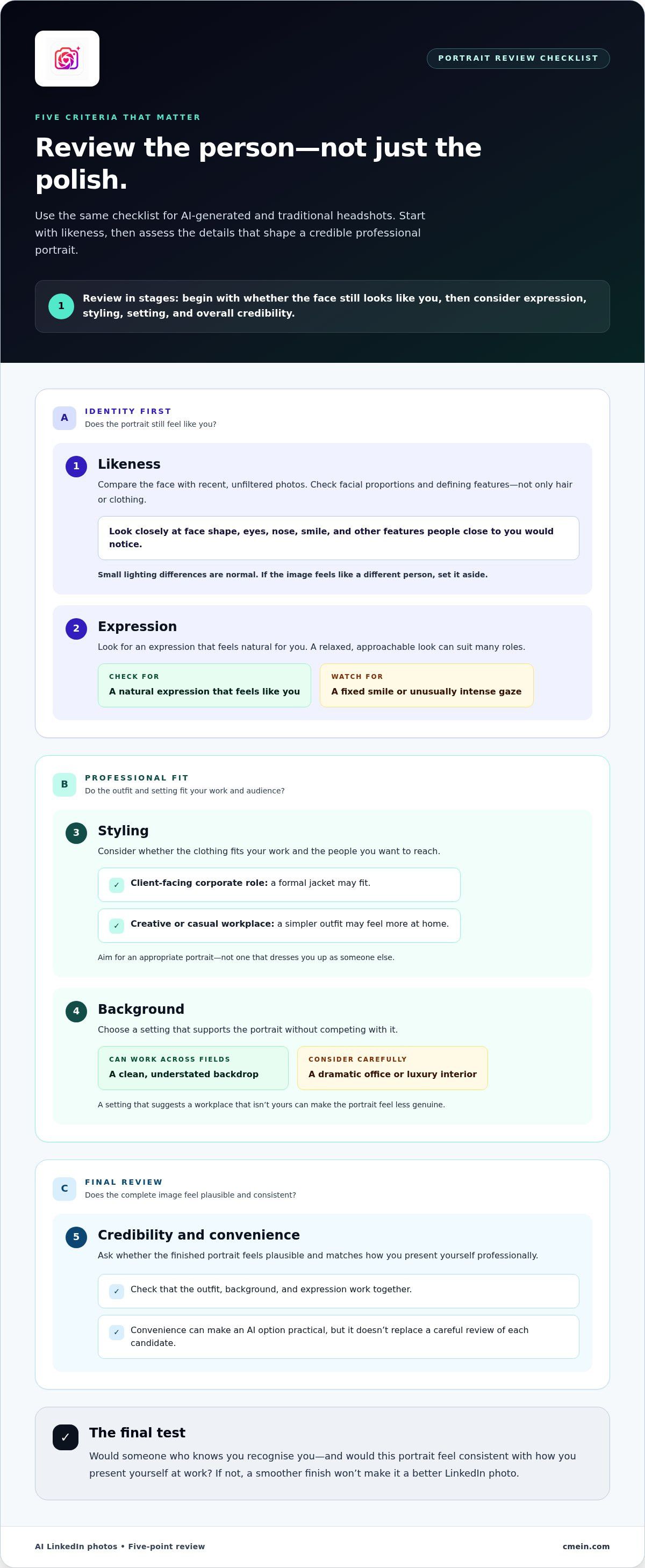
A useful comparison isn’t about picking the smoothest skin or most impressive backdrop. Judge each image against the same five criteria: likeness, expression, styling, setting, and overall credibility. This helps you focus on how you want to present yourself, rather than on polish alone.
- Likeness: Compare the face with recent, unfiltered photos. Check facial proportions and defining features, not just hair or clothing. If the image feels like a different person, set it aside.
- Expression: Look for an expression that feels natural for you. A relaxed, approachable look can suit many roles, but a fixed smile or unusually intense gaze may feel out of character.
- Styling: Consider whether the clothing fits your work and audience. A formal jacket may suit a client-facing corporate role; a simpler outfit may feel more at home in a creative or casual workplace.
- Background: Choose a setting that supports the portrait without competing with it. A clean, understated backdrop can work across fields, while a dramatic office or luxury interior may suggest a professional setting that isn’t yours.
- Credibility and convenience: Ask whether the complete image feels plausible and consistent with how you present yourself. Convenience can make an AI option practical, but it doesn’t replace a careful review of each candidate.
Does the image still look recognisably like you?
Put a candidate beside a few recent, unfiltered photos, ideally with different lighting and expressions. Compare the shape of your face, eyes, nose, smile, and other features people close to you would notice. Small differences in lighting are normal; altered proportions or a changed overall appearance are not. Don’t choose an image just because it looks more polished. If a colleague or friend might hesitate to recognise you, keep looking.
Does the style fit your work and audience?
Think about where people are likely to meet you professionally. Your portrait should feel appropriate for that setting, not dressed up as someone else. Check that the outfit, background, and expression work together and don’t imply a role or workplace that feels false. A broadly professional look is enough. Overproduced details can make a portrait feel less credible, not more.
Use the same checklist for every option, whether it’s AI-generated or taken in a traditional photoshoot. CMeIn creates AI-generated professional LinkedIn headshots as an alternative to corporate photoshoots, with an emphasis on natural likeness and credibility. Explore AI LinkedIn photos.
AI LinkedIn Photos vs. a Traditional Photoshoot: Which Fits?
Both approaches can give you a professional portrait. The difference is how the image is made and how involved you want to be in creating it. AI LinkedIn photos offer an alternative if you want an updated headshot without arranging an in-person session. A traditional photoshoot puts a photographer and camera in the room. The right choice depends on your schedule, preferred process, and whether the final image is one you trust.
| What to compare | AI-generated headshot | Traditional photoshoot |
|---|---|---|
| Process | A portrait is generated using an AI service. The exact process varies by service. | A photographer makes portraits during an in-person session. |
| Convenience | Can suit someone who wants a professional image without scheduling a shoot. | Requires arranging and attending a photography session. |
| Image review | You review the generated candidates and decide which, if any, feel right. | You review photographs from the session and choose a suitable portrait. |
When an AI-generated headshot may suit you
An AI option may fit if your profile needs a current portrait but coordinating an in-person shoot feels like a hurdle. It can be a practical approach when you’re updating your professional presence around other commitments. Still, convenience isn’t a reason to lower the bar. Compare the candidates, check that each image feels like you, and choose for credibility rather than a polished finish alone.
Generated portraits require a clear final choice. Don’t assume every option is equally convincing. Compare the faces and overall impression, then set aside anything that looks unlike you or suggests a professional setting that doesn’t fit. The process may be convenient, but reviewing the result remains important.
When a traditional photoshoot may suit you
A photoshoot may appeal if you prefer a photographer to guide the portrait-making session in person. You can be directly involved as the images are taken, with the photographer present during the process. That can feel more comfortable if you want a real-time, human-led session. It also means making time for an appointment and being photographed on the day.
Consider what helps you make a good decision. If you prefer reviewing generated options at your own pace, AI may feel more practical. If you value an in-person process, a photographer-led session may suit you better. In either case, judge the final image by whether it represents you and fits your work. For an AI alternative to a corporate photoshoot, explore AI LinkedIn headshots.
How to Judge an AI LinkedIn Headshot Before You Use It
Don’t choose a candidate by scrolling quickly and stopping at the most polished one. Review each image in the same order, starting with the face and then considering the surrounding details. This makes it easier to catch a portrait that looks impressive at first but feels wrong on closer inspection.
A four-step review for your candidate images
- Check the face against recent photos. Compare facial proportions and defining features with photos that show how you look now. Look beyond hair, clothing, and lighting. Ask whether someone who knows you would recognise you without needing to read your name.
- Read the expression. Look at the eyes and mouth, then consider the overall expression. Does it seem relaxed and familiar, or fixed in a way that feels unlike you? A small change in expression can alter the impression a portrait gives, so choose one that feels natural rather than staged.
- Assess clothing and setting together. Check whether the outfit makes sense for your work and whether the background supports the portrait. A formal look may suit some professional settings, while a simpler one may fit better elsewhere. Neither is automatically better. The combination should feel plausible for your role and audience.
- Make the credibility call. Step back and consider the full image. Would it feel consistent with how colleagues meet you in a video call, at work, or at an industry event? Choose the portrait that feels credible and recognisable, not simply the one with the smoothest finish.
Review the finalists at the size they’ll appear on your profile as well as at a larger size. A portrait can look convincing when enlarged but lose clarity when small, or seem natural up close yet overly processed at a glance. If you’re unsure between two options, show both to someone who knows you and ask which feels more like you. Treat their response as a useful check, not a vote on which image is more flattering.
Signs a headshot may feel less credible
Pause if the image changes features that make you recognisable, or if its expression feels unlike the one people see in person. A background that draws more attention than your face can also weaken the portrait’s professional feel. So can styling that suggests a workplace or level of formality that doesn’t match your own. These details are reasons to review the image carefully.
Artificial polish isn’t evidence that a headshot will work well on LinkedIn. If an image feels like a version of you that colleagues wouldn’t expect to meet, keep looking. CMeIn creates AI-generated professional LinkedIn headshots with a focus on natural likeness and credibility. Explore AI LinkedIn headshots as an option for updating your professional portrait.
Choose CMeIn for AI LinkedIn Photos Without a Traditional Shoot
Once you know what makes a headshot feel credible, choosing how to get one becomes more straightforward. CMeIn creates AI-generated professional LinkedIn headshots as an alternative to a traditional corporate photoshoot. It’s an option for people who want to update their profile without arranging an in-person session.
The aim isn’t to make every person look the same or turn a profile photo into a different version of you. A useful result should feel appropriate for LinkedIn while keeping your likeness recognisable. Your review still matters: choose a portrait that fits your appearance and professional context.
What CMeIn’s LinkedIn headshot service is designed to do
CMeIn’s AI LinkedIn photos are professional portraits intended for LinkedIn use. The service offers a practical route for people who want an updated image without scheduling a traditional shoot. As you consider a portrait, keep three priorities in view: does it look like you, does it fit your professional context, and does the overall impression feel credible?
Those checks help separate a portrait that simply looks polished from one that feels right for your profile. A formal style may suit your work, but it shouldn’t make you seem like someone your colleagues wouldn’t recognise. A clean, professional presentation is useful only when it still feels connected to you.
A straightforward next step for an updated profile photo
If you’re considering an AI headshot, use the review steps from this guide before settling on an image. Compare the face with recent photos, consider whether the expression feels natural, and check that the clothing and background suit your work. Then take a final look at the whole portrait. Does it feel like a believable representation of you in a professional setting?
An updated profile photo is one part of your LinkedIn presence, not a substitute for your experience or the rest of your profile. Choose an image you’d feel comfortable having a colleague, client, or recruiter see. If none of the options feel recognisable or credible, don’t use one just because it looks finished.
CMeIn creates AI-generated professional LinkedIn headshots for people seeking an alternative to a corporate photoshoot. Review the result against your own standards and choose a photo that feels like you. Explore CMeIn AI LinkedIn photos.
Choose a Profile Photo That Feels Right for What’s Next
A professional profile photo can’t do the work of your experience, and it doesn’t need to. Its job is to offer a clear, believable introduction before the conversation begins. Choose the image that feels most like the person you are at work, not simply the one that seems most impressive on screen.
Before updating your profile, take one last look at your options with fresh eyes. Would you feel comfortable being recognised from the picture in a meeting or by a new contact? There’s no need to chase a perfect-looking image. Trust the one that feels natural, clear, and consistent with how you show up.
AI LinkedIn photos can be one way to explore an updated professional portrait. Explore CMeIn AI LinkedIn photos and choose a headshot that feels like you.
Frequently Asked Questions
Can you use an AI-generated photo as your LinkedIn profile picture?
You can use an AI-generated portrait if it represents you accurately and fits your professional context. There’s a difference between an AI-made image that still looks like you and one that changes your appearance enough to mislead viewers. If you’re unsure about platform requirements, check LinkedIn’s current guidance before using the image. Make likeness the deciding factor, not whether the portrait looks more impressive than a real photo.
Will employers know if your LinkedIn photo was made with AI?
Some viewers may notice visual inconsistencies, such as details that look out of place or styling that doesn’t fit your usual appearance. That doesn’t mean people can reliably identify every AI-generated image. Focus instead on choosing a portrait that looks recognisably like you and feels credible. Use an image you’d be comfortable discussing if someone asks about it, and that fits how you present yourself in professional settings.
Are AI LinkedIn headshots suitable for a resume too?
They may be suitable if your resume format and application context call for a photograph. Don’t assume every resume needs one; expectations differ by employer, role, and application instructions. If an application asks for a photo, choose a current portrait that matches your professional profile. If it doesn’t, follow the stated format rather than adding an image by default. Consistency helps, but the application requirements come first.
Do you need a professional photographer to get a LinkedIn headshot?
No. A photographer is one way to get a professional portrait, but it isn’t the only option. AI LinkedIn photos can suit people who want a headshot without scheduling an in-person shoot. Whichever route you choose, judge the image itself: does it look like you, fit your role, and feel believable? A photographer’s involvement or an AI-made finish can’t replace those checks.
Should your LinkedIn photo match your other professional profile pictures?
Using a recognisable portrait across professional profiles can help contacts connect your accounts with you, especially if they move between platforms. The images don’t have to be identical. A conference bio may call for a more formal look than a portfolio, for example. Keep your appearance recognisable, but choose a style that suits each audience. Update older pictures when they no longer reflect how you look now.
What should you do if an AI headshot does not look like you?
Don’t use a portrait that changes your recognisable features or leaves you feeling misrepresented. Compare it with recent photos and look for another candidate that better reflects your current appearance. If none feels believable, don’t force a choice just to update your profile. You can reassess whether an AI portrait suits your needs or use a different current image that you’re comfortable presenting professionally.