Why Am I Not Getting Matches on Hinge? A Clear Troubleshooting Guide
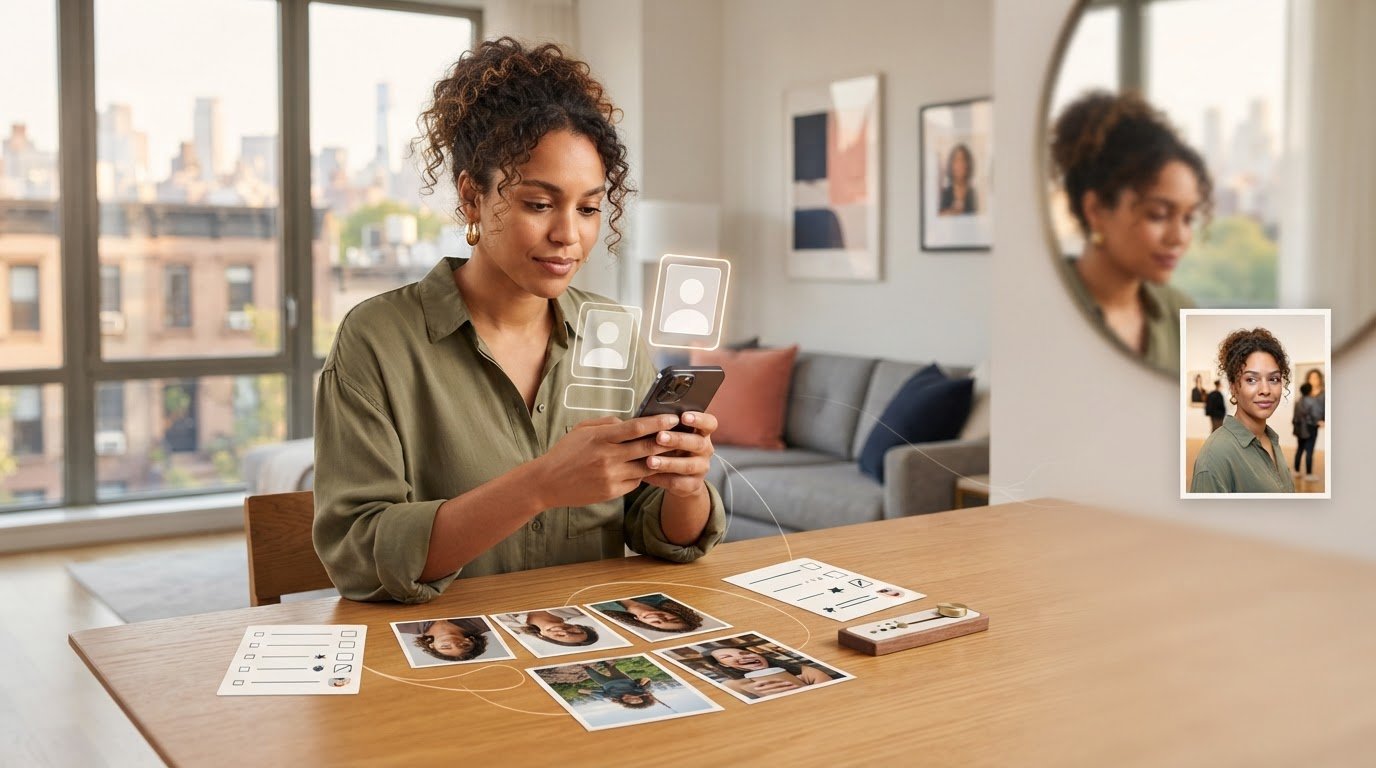
If you’re asking, “why am I not getting matches on Hinge?” after checking the app and seeing little interest, it’s understandable to want a clear explanation. But low engagement isn’t a verdict on you, and guessing at the cause can waste time. It may help to look at the whole profile rather than focus on one photo or assume the algorithm is responsible.
Photos, prompts, preferences, and account access can all affect your experience. Start with what you can check, then make a focused change instead of changing everything at once.
This guide walks through the likely causes in a practical order. You’ll learn how to review your photos, prompts, preferences, and account, and when to use Hinge’s official support. The aim is to find a useful next step, not another reason to blame yourself or the algorithm.
Key Takeaways
- Separate no likes, few matches, and matches that don’t start conversations. Each pattern suggests a different part of your profile or account to review.
- Ask “why am I not getting matches on Hinge” by checking your photos, prompts, preferences, and account settings rather than guessing how the algorithm works.
- Use photos that make it easy to see what you look like, and prompts that give people a natural way to start a conversation.
- Follow a simple reset: check account access and preferences, review your profile, then change one meaningful element at a time.
- Consider refreshing photos if your current set is outdated, unclear, or repetitive. New images can’t fix account or settings issues or guarantee matches.
Table of Contents
- Why am I not getting matches on Hinge? Start with the likely causes
- How Hinge photos, prompts, and preferences shape first impressions
- How to tell whether photos, prompts, or settings are holding your Hinge profile back
- How to get more matches on Hinge: a focused profile reset
- When new Hinge photos make sense, and how CMeIn can help
Why am I not getting matches on Hinge? Start with the likely causes
A quiet Hinge inbox is a reason to investigate, not proof that something is wrong with you. One slow stretch can’t tell you whether the issue is your photos, profile details, preferences, or something unrelated to your profile.
“No matches” can describe different experiences. You might receive no likes, get a few matches but rarely start a conversation, or see little activity over a short period. These patterns aren’t interchangeable. A match who doesn’t message raises a different question from a profile that seems to attract no interest.
Start with what you can inspect: are your photos clear and current? Does your profile give someone enough to respond to? Are your preferences narrower than you intended? Does the app work as expected? Separate profile performance from account access. If the app isn’t working normally, that’s a different issue from how your profile comes across.
Low visibility and an unconvincing profile are different problems. Visibility is about whether your profile reaches potential matches; profile appeal is about what someone sees if it does. You can review your profile directly. You usually can’t know how Hinge’s recommendation system handled a particular profile or like.
What does getting no matches on Hinge actually tell you?
By itself, very little. A quiet period doesn’t identify a cause or prove your account is hidden or penalised. Start with the basics: can you access your account, are your preferences set as intended, and does the app behave normally? Hinge’s Wikipedia page on the app offers background on its history and features, but it can’t diagnose your account.
If you can’t log in, edit your profile, or use features as expected, treat that as an access or account issue, not a photo problem. Look for an explanation in the app and use Hinge’s official support if the issue continues. A quiet inbox alone doesn’t establish that your account is restricted.
Could your Hinge profile be the issue, rather than the algorithm?
It could be. Profile elements are easier to assess than an unseen recommendation system. Look at your profile as a stranger would: is it clear who you are, what you enjoy, and what kind of connection you’re open to? Can someone recognise you in your photos? Do your answers offer an easy conversation opening? Match activity also depends on your preferences and who is active, so even a thoughtful profile can’t control every outcome.
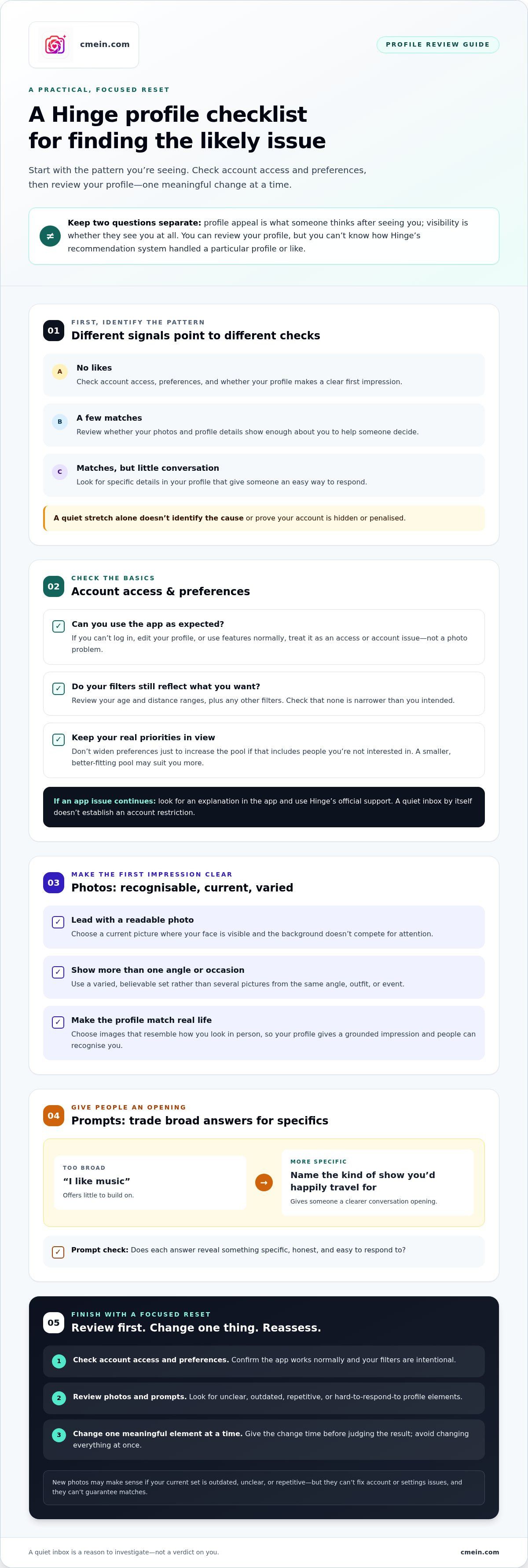
- No likes: Review account access, preferences, and whether your profile makes a clear first impression.
- Few matches: Check whether your photos and profile details show enough about you to help someone decide.
- Matches, but no conversation: Look for specific details in your profile that someone could respond to.
If you’re asking, “why am I not getting matches on Hinge,” first identify the pattern you’re seeing. Then check the part of the process it points to. Avoid changing everything at once or assuming you know what the algorithm is doing.
How Hinge photos, prompts, and preferences shape first impressions
Your profile gives people a quick sense of who you are and whether they’d like to know more. Photos help them recognise you and get a feel for your everyday life. Prompts add context, while preferences shape who may appear in your pool. Each part matters, but none can explain every quiet stretch on its own.
Profile appeal affects what someone thinks after seeing you; visibility affects whether they see you at all, and compatibility depends on whether your preferences overlap. Keep these questions separate. Your profile can be clear and appealing while your pool is still limited by your preferences.
Do Hinge profile pictures affect whether someone responds?
Photos create a fast first impression, so make your lead image easy to read. Choose a current picture where your face is visible and the background doesn’t compete for attention. Use a varied, believable set that gives a fuller sense of you, rather than several pictures from the same angle, outfit, or occasion.
Choose photos that resemble how you look in person. A polished image that feels unlike you can create a mismatch between your profile and a first meeting. If you’re asking “why am I not getting matches on Hinge,” consider whether a stranger could recognise you and get a grounded impression from the full set, not just whether each photo looks impressive on its own.
Can weak prompts or tight preferences limit your matches?
Prompts work best when they give someone a detail to respond to. “I like music” offers little to build on; naming the kind of show you’d happily travel for gives a viewer a clearer opening. UC Berkeley’s research on appealing online dating profiles discusses the value of helping someone feel they know you. Specific, honest details can help do that.
Preferences matter too. Review your age and distance ranges, along with any other filters you’ve set. Check that they still reflect what you want and that none is narrower than you intended. Don’t widen them just to increase the pool if the change would include people you’re not interested in. A smaller pool that suits you may be a better fit than a larger one that ignores your priorities.
- Photos: Can someone see your face clearly? Do the images feel current and varied?
- Prompts: Does each answer reveal something specific or offer a natural conversation opening?
- Preferences: Do your ranges reflect your real boundaries without accidental limits?
Change the part that seems weakest, then give it time before judging the result. If your photos feel outdated or don’t show you clearly, AI-generated Hinge dating photos can help refresh your set. Choose images that still look like you and show believable settings. New photos can improve the impression your profile makes, but they can’t change your preferences, guarantee compatibility, or resolve an account issue.
How to tell whether photos, prompts, or settings are holding your Hinge profile back
Once you’ve identified the pattern, match it to something you can check. A quiet inbox doesn’t reveal how Hinge’s recommendation system handled your profile. You can, however, review what’s visible, confirm your settings, and check whether the app is working as expected.
Symptom: Few profile views or little apparent activity. Check that your account is accessible, your profile is complete, and your visibility settings and preferences are as intended. A narrow age or distance range may limit the people you could encounter, but that doesn’t mean the setting is wrong for you.
Symptom: People may see your profile, but interest is limited. Review your photos and prompts as a set. Are the images clear and current? Do your answers show something specific about you, or could they belong to almost anyone?
Symptom: You get matches, but they don’t engage. Check whether your prompts and profile details give someone an easy, natural way to start a conversation. This clue doesn’t prove your profile is the cause; people’s interest and timing vary.
Symptom: The app behaves unexpectedly. If you can’t access your account, edit your profile, or use features as expected, treat it as a possible technical or account-access issue. Use Hinge’s official support resources rather than trying to fix an app problem by rewriting your profile.
What clues suggest your photos need a refresh?
Review each image for four things: is it recent, clear, varied, and consistent with your current appearance? A group-heavy set can make it hard to tell who you are. Sunglasses or other obstructions can hide your face, while several near-identical pictures can make the profile feel repetitive. Heavily altered images may also create a gap between your profile and how you look in person.
Assess the full set, not just your favourite picture. If you find repeated issues, use the separate photo-mistakes guide for a closer image audit before replacing pictures at random.
What clues point to prompts, preferences, or account issues?
Read your prompts as if you’ve never met yourself. Answers that are very general may give someone little to reply to. A specific detail, such as what you enjoy doing on a free evening, gives them something concrete to pick up. Then check that your preferences and profile visibility settings still match what you intend. Don’t widen your preferences just to chase more activity.
If you’re still asking, “why am I not getting matches on Hinge,” make one meaningful adjustment at a time. Keep a simple note of what you changed and what you observe over each review cycle. One change followed by a match doesn’t prove the change caused it. Look for a pattern across reviews, and avoid changing photos, prompts, and settings all at once. This makes it easier to see what may be helping without mistaking coincidence for an answer.
How to get more matches on Hinge: a focused profile reset
A useful reset starts with checks, not a complete profile overhaul. If you’re still wondering why am I not getting matches on Hinge, follow this order so you don’t spend time replacing photos when the issue may be account access or settings.
- Check account access. Confirm you can sign in, open your profile, and use the app as expected. If you see error messages or features aren’t working, address that separately through Hinge’s official support resources.
- Review your preferences. Look at your age, distance, and other filters. Correct settings that don’t reflect what you want, but don’t widen your search just to increase activity.
- Audit the profile. Check whether a stranger can recognise you, understand a little about you, and find a natural conversation opening. Ask someone you trust whether the profile feels clear and recognisably like you. Invite honest feedback, not a rating.
- Revise one element. Start with the most noticeable issue, such as an unclear lead photo or a prompt that says very little. Keep the rest of the profile steady so you can make a more useful comparison.
What should you update first on a Hinge profile?
Fix what a stranger would notice first. If your lead photo makes it hard to see your face, choose a clearer, current image. If your prompt could describe almost anyone, replace it with a concrete detail that sounds like you. A guide to choosing authentic dating profile photos can help you assess the full set. Aim for recognisable, believable images, not a version of yourself you’d struggle to match in person.
Before editing, save or write down your current prompts and note which photos are in which slots. That gives you a simple record to compare against and helps you remember what changed. You don’t need a complicated tracking sheet; a few notes are enough.
How can you test profile changes without guessing?
Change one meaningful area, then observe the overall pattern in your interactions. Don’t treat a quiet day or one new match as proof that an edit worked. App activity varies, and short-term changes can happen for reasons you can’t see. Give yourself time to assess the update without checking constantly or setting an expected match count.
If you don’t notice a difference, reconsider the diagnosis. Review another possible cause, such as preferences or account access, rather than replacing every photo in quick succession. The goal isn’t to find a guaranteed formula. It’s to make each adjustment clear enough that you can decide whether it’s worth keeping.
If your photo audit shows that your current set is unclear, outdated, or repetitive, create refreshed AI dating photos for your Hinge profile as one focused change. Keep the images consistent with your real appearance and choose believable settings. New photos can refresh your profile’s first impression, but they can’t correct settings or account problems or guarantee matches.
When new Hinge photos make sense, and how CMeIn can help
New photos make sense when there’s a visible issue with the pictures you already have. They may be outdated, hard to see, repetitive, or no longer representative of how you look. A refresh can give your profile a more accurate, varied first impression. It can’t guarantee matches, widen your preferences, or fix an account-access problem.
Photos are one part of a profile reset, not a substitute for checking the rest. If your images already look clear and current, consider whether prompts, preferences, or app access deserve attention first. There isn’t always a photo-only answer to “why am I not getting matches on Hinge.”
Are AI dating photos a sensible option for a Hinge refresh?
They can be an alternative to arranging a traditional photo shoot when your existing set needs more variety. CMeIn creates AI-generated dating photos for Hinge and other dating apps, with guidance on choosing a profile set. Look for images that preserve your recognisable likeness and show plausible settings, rather than presenting you as a different person.
Before using AI-generated images, review Hinge’s current official rules on profile photos and authenticity. Don’t assume an image is permitted just because it looks natural. Platform rules can change, so check the current guidance before uploading.
How to choose profile images that still feel like you
Use a simple real-life test: would someone recognise you from the photo at a first meeting? Does the setting fit your life, and does the styling feel like something you’d actually wear? Choose a mix that feels believable and consistent with your everyday appearance. Avoid dramatic changes in appearance, implausible settings, or poses that create expectations you don’t want to meet.
An AI dating photo guide can help you think through how each image fits the full set. Judge the pictures together, not just one at a time. A polished image may stand out, but it should still feel like an honest introduction.
- Consider a refresh if your current photos are unclear, outdated, repetitive, or unlike your current appearance.
- Review other causes first if your photos already represent you well, or if you suspect a settings or account issue.
- Choose for accuracy so the person in your profile matches the person someone can expect to meet.
Use new images as one testable change in a broader profile review. If refreshed photos fit the issue you’ve identified, explore CMeIn dating photos to build a Hinge profile set. Keep what feels recognisably you and leave out anything that doesn’t.
Make your next profile change with purpose
It’s easy to let a quiet inbox turn into a verdict on yourself. Don’t. A dating profile is a small introduction, not a measure of your worth. Asking “why am I not getting matches on Hinge” can help you decide what to check, but it doesn’t have to become a judgment about who you are.
Choose one next step you can stand behind. Make a change because it represents you more clearly, not because you’re trying to reshape yourself around an unpredictable response. Then give your profile room to introduce you to people who may be a good fit.
If new images are the change you’ve decided to explore, explore CMeIn dating photos to refresh your profile with AI-generated dating photos. Choose images that feel grounded in how you look and who you are. You can improve your introduction without pretending to control every outcome. Start with CMeIn’s AI dating photo packages and choose a profile refresh that feels genuinely yours.
Frequently Asked Questions
Is it normal to get no matches on Hinge at first?
Yes, it can happen, and a quiet start doesn’t tell you much on its own. Your profile may be new to people currently active in your preferred pool, or your preferences may make that pool smaller. Check that your profile is complete and your account works as expected before drawing conclusions. Avoid treating the first few days as a verdict on your appearance or dating prospects.
Can changing my Hinge photos help me get more matches?
It may help if your current photos make it hard to recognise you or give an incomplete impression. For example, replacing a distant group shot with a clear photo of you could make your profile easier to understand at a glance. Change photos when you’ve spotted a specific issue. A photo update can’t guarantee matches, and it won’t fix an incorrect preference or an account problem.
How long should I wait before changing my Hinge profile again?
There’s no reliable universal waiting period. Give a change enough time to receive a fair look from people who fit your preferences, rather than editing again after one quiet evening. Keep a note of what you changed and look for a broader pattern in activity. If you keep changing several things at once, you won’t know which edit, if any, made a difference.
Does Hinge tell you if your profile is hidden or restricted?
Don’t assume a lack of matches means your profile is hidden or restricted. A quiet inbox alone doesn’t confirm either. Look for an in-app notice, error, or change in account access, and check whether you can still use your profile normally. If something specific seems broken or a restriction message appears, consult Hinge’s official support resources for guidance on your account.
Can my Hinge preferences limit who sees or matches with me?
Yes. Preferences such as age and distance can narrow the pool of people you’re open to seeing, while other filters may shape who fits your search. Review each setting and compare it with what you actually want. For example, check that a distance limit reflects your genuine willingness to travel. Don’t loosen preferences that matter to you just to increase the number of potential profiles.
Can I use AI-generated photos on Hinge?
Check Hinge’s current rules before uploading AI-generated images. Don’t assume that a realistic-looking photo is automatically acceptable under the platform’s policies. If you use generated images, choose ones that clearly resemble you and don’t create a misleading impression of your appearance or lifestyle. CMeIn creates AI-generated dating photos for apps including Hinge, but follow the platform’s current guidance when deciding what to upload.
Do Hinge prompts matter if my photos are strong?
Yes. Strong photos may catch someone’s attention, but prompts can help them decide what to say or whether your interests feel compatible. A specific answer gives more to respond to than a broad statement. For example, mention the kind of weekend activity you genuinely enjoy instead of writing only that you like having fun. Keep the answer natural, so it sounds like something you’d say in conversation.