Creating an Image From Photo: AI Methods That Work in 2026

Creating an image from photo has evolved from simple filters and manual editing into sophisticated AI workflows that preserve identity while generating entirely new scenes. Whether you're building a professional portfolio, enhancing your social presence, or creating content that demands consistency, understanding how modern photo-to-image pipelines work gives you control over quality and authenticity. This guide explores the technical foundations, practical workflows, and real-world applications that make photorealistic synthesis possible without losing what makes you recognizable.
Understanding the Core Technologies Behind Image From Photo
The process of generating an image from photo relies on neural networks trained to understand both the structure of faces and the patterns of photographic scenes. Modern approaches use diffusion models and conditional adversarial networks to bridge the gap between a source reference and a target output.
Diffusion-Based Image Synthesis
Denoising diffusion probabilistic models have become the foundation for most state-of-the-art image-from-photo systems. These models work by gradually adding noise to training images, then learning to reverse the process. When you provide a reference photo, the model conditions its denoising steps on your facial features, ensuring the output maintains your likeness.
The practical advantage is consistency. Unlike earlier GAN-based methods that could produce unpredictable artifacts, diffusion models generate stable, coherent results across multiple runs. This stability matters when you need ten images from photo uploads that all look like the same person.
Image-to-Image Translation Architectures
Paired image-to-image translation methods established the conceptual framework that most modern systems build upon. The pix2pix architecture demonstrated that networks could learn mappings from one image domain to another while preserving structural correspondence.
For creating an image from photo, this means:
- Feature preservation: The network learns which aspects of your face must remain constant (bone structure, eye spacing, skin tone)
- Scene adaptation: Background, lighting, and context can change while your core identity stays intact
- Conditional control: You can specify target attributes (formal attire, outdoor setting, specific pose) without retraining
| Approach | Training Data | Identity Preservation | Scene Flexibility | Typical Use Case |
|---|---|---|---|---|
| Pix2pix | Paired images | Moderate | Limited to training domains | Style transfer, semantic editing |
| CycleGAN | Unpaired images | Lower | High domain variety | Artistic transformation |
| Diffusion + ControlNet | Large-scale + conditioning | High | Very high | Photorealistic scene generation |
| Fine-tuned portrait models | Personal photo sets | Very high | Moderate | Individual likeness consistency |
The Hugging Face img2img documentation provides hands-on examples of implementing these architectures. Their Diffusers library simplifies the technical complexity, making it possible to generate an image from photo with just a few lines of code and a pre-trained checkpoint.
Practical Workflows for Generating Images From Photos
Creating production-quality results requires more than running a model once. Professional workflows combine multiple stages, each addressing a specific quality concern.
Preparation and Reference Selection
Start with high-quality source material. Your reference photos should show your face clearly, with good lighting and minimal motion blur. The model can only preserve features it can detect, so clarity in your input directly determines consistency in your output.
- Collect diverse references: Front-facing, profile, and three-quarter angles help the model understand your facial structure from multiple viewpoints
- Ensure consistent lighting: Photos taken in similar lighting conditions reduce the model's burden of inferring how your features appear under different illumination
- Avoid heavy filtering: Pre-processed images with beauty filters confuse feature extraction, leading to inconsistent results across generated images
When working with AI-generated photos for dating profiles, this preparation stage determines whether your generated images look like genuine photos or obvious composites.
Conditioning and Control Mechanisms
Modern image-from-photo pipelines accept multiple forms of guidance beyond just the source photo. Depth maps, pose skeletons, and semantic masks give you precise control over the output while the model handles photorealistic rendering.
For example, if you want to generate an image from photo showing you in a professional setting:
- Extract a pose skeleton from a stock photo of someone in a business environment
- Use your reference photo to condition facial features
- Provide a depth map that defines the spatial layout of the scene
- Let the model synthesize the final image combining all three inputs
This layered approach appears in services like CMeIn's AI photos, where scene composition and personal likeness merge without the artificial quality that plagued earlier generation methods.
Iterative Refinement and Quality Control
No model produces perfect results on the first run. Professional workflows include verification steps that catch common failure modes before they compound.
Common quality checkpoints:
- Facial feature consistency: Compare key landmarks (eye position, nose shape, jawline) across all generated images
- Lighting coherence: Verify that shadows and highlights match the implied light sources in each scene
- Resolution and detail: Ensure fine details (skin texture, hair strands) remain sharp and don't show the characteristic blur of over-smoothed AI outputs
- Anatomical plausibility: Check for distorted hands, impossible body positions, or merged objects that indicate model confusion
The TensorFlow pix2pix tutorial demonstrates these quality checks in a hands-on context, showing how to spot and correct common artifacts during the generation process.
Advanced Techniques for Preserving Identity
Maintaining your recognizable features across wildly different scenes is the core challenge of creating an image from photo. Several specialized techniques address this directly.
Fine-Tuning on Personal Photo Sets
Training a model specifically on your photos creates a personalized checkpoint that "knows" your face intimately. This approach typically requires 15-30 reference images and several hours of compute time, but the results show significantly better identity preservation than generic models.
The process works by continuing training from a general-purpose checkpoint, adjusting the model's weights so it associates your facial features with the specific token or concept identifier. When you later prompt the model to generate an image from photo, it retrieves this learned representation rather than approximating from population-level statistics.
| Fine-Tuning Method | Training Images Needed | Compute Time | Identity Accuracy | Scene Variety |
|---|---|---|---|---|
| DreamBooth | 15-25 | 2-4 hours (A100) | 92-95% | Very high |
| Textual Inversion | 5-10 | 1-2 hours | 85-90% | High |
| LoRA | 10-20 | 1-3 hours | 88-92% | Very high |
| Full fine-tuning | 50+ | 6-12 hours | 95-98% | Moderate |
Embedding-Based Identity Preservation
Rather than fine-tuning the entire model, embedding methods extract a compact representation of your facial features and inject it during generation. This representation acts as a portable identity signature that can be reused across different models and scenes.
Face recognition networks trained on millions of identities learn to encode what makes each person unique. By extracting your embedding from reference photos and conditioning the generation process on this vector, you ensure the output resembles you regardless of the target scene's complexity.
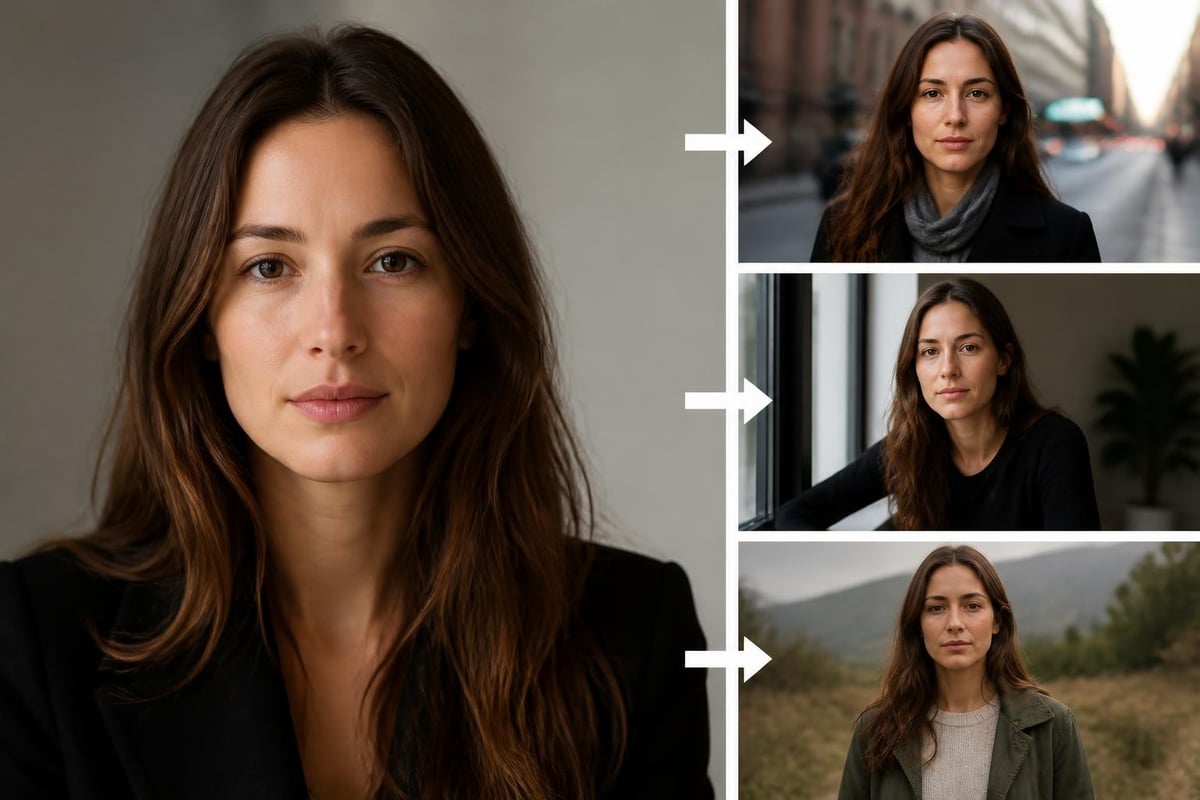
Services focused on AI headshot generation rely heavily on embedding-based methods because they need to produce professional portraits that unmistakably depict the subject while varying background, attire, and lighting.
Multi-Stage Pipelines for Photorealism
Professional results often combine several specialized models in sequence, each handling a specific aspect of quality.
A typical multi-stage workflow for generating an image from photo might include:
- Initial generation: A diffusion model conditioned on your reference photo creates the base image in the target scene
- Face restoration: A specialized face model enhances facial details, correcting any artifacts from the initial generation
- Super-resolution: ESRGAN upscaling increases resolution while preserving natural texture
- Inpainting corrections: Any remaining issues (odd hands, background anomalies) get fixed using partial convolution inpainting
- Color harmonization: Final color grading ensures the generated elements blend seamlessly with any preserved portions of the original photo
This approach appears in professional applications where the cost of a visible artifact outweighs the computational expense of multiple processing passes.
Choosing the Right Approach for Your Use Case
Different applications demand different trade-offs between identity preservation, scene flexibility, and processing time. Understanding these trade-offs helps you select the appropriate method for generating an image from photo.
Dating Profiles and Social Media
Priority: Authenticity and recognizability
For contexts where viewers will eventually meet you in person, the generated image from photo must look unmistakably like you. Over-idealized outputs create expectations that real-world encounters can't meet, undermining the entire purpose.
Best practices include:
- Use recent reference photos (within six months)
- Avoid heavy retouching or beautification filters
- Generate scenes that match activities you actually engage in
- Maintain natural skin texture and facial asymmetries
CMeIn's approach focuses specifically on this balance, generating realistic AI photos that preserve your actual appearance while placing you in appealing contexts. The service creates images for dating profiles where authenticity determines success more than superficial perfection.
Professional and Corporate Applications
Priority: Polish and appropriateness
Business contexts require generated images that project competence and professionalism without obvious AI artifacts. The image from photo workflow should produce results that pass casual inspection as studio-quality photography.
Key requirements:
- Consistent lighting that matches professional studio setups
- Appropriate attire that reflects industry norms
- Neutral or contextually relevant backgrounds
- Sharp focus on facial features with natural depth of field
The CMeIn headshot service demonstrates this application directly, transforming casual photos into professional headshots suitable for LinkedIn, corporate directories, and business communications.
Content Creation and Personal Branding
Priority: Visual variety and storytelling
Influencers, creators, and personal brands need a steady stream of fresh visual content. Generating an image from photo enables maintaining consistent personal appearance across diverse scenes and concepts without the logistical complexity of constant photo shoots.
Effective workflows for this use case include:
- Batch generation across multiple scene templates
- Seasonal and trending context adaptation
- Maintaining stylistic consistency across a content calendar
- Quick iteration on concepts without photographer scheduling
Browse examples of this approach at CMeIn's examples gallery, which shows how the same individual's likeness adapts to different scenarios while maintaining visual consistency.
Legal and Ethical Considerations
Creating an image from photo raises important questions about rights, consent, and authenticity that responsible users must address.
Copyright and Ownership
The U.S. Copyright Office guidance on AI-generated works establishes that images created primarily by AI systems receive limited copyright protection. If you generate an image from photo using your own reference photos, you likely own the output, but the specific legal boundaries remain unsettled.
Practical guidelines:
- Only use reference photos you own or have explicit rights to use
- Understand that the AI model itself was trained on images with varying copyright status
- When generating images depicting other people, obtain clear consent for both the reference photo use and the generated outputs
- Document your creative process if you plan to assert copyright claims on generated works
Authenticity and Disclosure
When you create an image from photo and present it as if it were a conventional photograph, you blur the line between documentation and synthesis. Different contexts demand different levels of disclosure.
For dating profiles, failing to disclose AI-generated images creates false expectations. For professional headshots, the distinction matters less if the image accurately represents your current appearance. For artistic or commercial work, disclosure norms vary by industry and platform.
Consider implementing a consistent disclosure practice:
- Tag AI-generated images in metadata
- Include disclosure in context where viewers might assume conventional photography
- Avoid using generated images in situations requiring documentary evidence
- Be transparent when asked directly about image sources
Evaluating Image Quality and Authenticity
Not all services that generate an image from photo produce equal results. Developing evaluation criteria helps you identify quality issues before they undermine your goals.
Technical Quality Markers
Sharpness and detail: Zoom to 100% and examine fine details like individual hair strands, skin pores, and fabric texture. AI-generated images often show characteristic smoothness or repetitive patterns that conventional photography doesn't exhibit.
Lighting consistency: Verify that shadows, highlights, and reflections all correspond to a single coherent light source. Generated images sometimes show impossible lighting where facial shadows point one direction while background shadows contradict them.
Anatomical correctness: Hands, ears, and teeth are common failure points. Count fingers, check ear symmetry, and verify that teeth don't merge or show impossible gaps.
Identity Verification Methods
When you generate multiple images from photo references, they should all depict the same recognizable person. Professional verification includes:
| Verification Method | What It Checks | Reliability | When to Use |
|---|---|---|---|
| Facial landmark alignment | Eye, nose, mouth position consistency | High | All applications |
| Embedding distance | Numerical similarity in face recognition space | Very high | Critical identity preservation |
| Human verification | Subjective assessment by viewers | Moderate | Final quality control |
| Cross-reference comparison | Side-by-side with source photos | High | Before publication |
Tools like CMeIn's photo analysis features can help evaluate whether generated images maintain the essential characteristics that make you recognizable across different contexts.
Future Developments in Photo-to-Image Generation
The field continues evolving rapidly, with several emerging capabilities that will change how we create an image from photo.
Real-Time Generation and Editing
Current workflows require seconds to minutes per image. Emerging models compress this to near-instantaneous generation, enabling interactive editing where you adjust scene parameters and see updated results immediately. This shift transforms the process from batch generation to creative conversation.
Enhanced Physical Consistency
Next-generation models incorporate physics-based rendering constraints, ensuring that lighting, shadows, and material properties behave according to real-world rules. When you generate an image from photo, these constraints prevent the subtle impossibilities that currently mark AI outputs.
Semantic Understanding and Scene Composition
Rather than just translating your face into a new context, upcoming systems understand scene semantics deeply enough to make compositional decisions. You might specify "professional outdoor portrait" and receive an image from photo that automatically selects appropriate attire, background, lighting, and pose based on learned patterns from expert photography.
Explore how these developments manifest in practical applications by reviewing CMeIn's pricing and feature tiers, which reflect the current state of commercially available technology.
Optimizing Your Reference Photos
The quality of images you can generate from photo depends heavily on your reference material. Strategic photo selection and preparation significantly improve output consistency.
Capture Guidelines for Reference Photos
Professional results require professional inputs. When building your reference set:
- Use natural light: Window light or outdoor shade provides even illumination without harsh shadows
- Face the camera directly: At least several photos should show your face straight-on, with eyes level with the lens
- Show expression variety: Include neutral expressions and natural smiles to give the model range
- Maintain consistent grooming: If you want generated images showing your current hairstyle and facial hair, ensure references match
Avoid these common reference photo mistakes:
- Extreme angles or tilted heads
- Sunglasses or accessories obscuring facial features
- Heavy makeup that changes your apparent facial structure
- Motion blur or soft focus
- Strong color casts from artificial lighting
Building a Balanced Reference Set
A complete reference set includes diversity across several dimensions. When you later generate an image from photo, this diversity helps the model handle various target scenes.
Recommended reference set composition:
- Lighting conditions: 40% soft natural light, 30% moderate indoor lighting, 20% bright outdoor, 10% dramatic lighting
- Expressions: 50% neutral/slight smile, 30% natural smile, 20% other expressions
- Angles: 60% front-facing, 25% three-quarter, 15% profile
- Contexts: Mix of casual and formal settings
You can explore how different photo types serve different purposes through CMeIn's photo type guidance, which breaks down which reference styles work best for specific output goals.
Integration With Existing Photo Workflows
Generating an image from photo doesn't exist in isolation. Most users integrate it with conventional photography and post-processing pipelines.
Hybrid Approaches That Combine Real and Generated Images
Rather than replacing photography entirely, many professionals use generation to fill gaps in their existing photo libraries. You might shoot real photos for certain contexts and generate an image from photo for scenarios that would be impractical or expensive to photograph conventionally.
For instance, a business professional might:
- Commission a single professional photo shoot in business attire
- Use those high-quality photos as references
- Generate images from photo showing themselves in various business settings (conference rooms, outdoor corporate campuses, international office backgrounds)
- Maintain a consistent professional appearance across dozens of contexts without dozens of photo shoots
Post-Processing and Enhancement Pipelines
Generated images often benefit from the same post-processing that improves conventional photography. Common enhancement steps include:
- Color correction: Adjusting white balance and color temperature to match your intended aesthetic
- Selective sharpening: Enhancing facial features while keeping backgrounds appropriately soft
- Minor retouching: Addressing temporary blemishes while preserving natural skin texture
- Composition refinement: Cropping to optimal aspect ratios and applying rule-of-thirds guidelines
Services like CMeIn's photo editor provide tools designed specifically for refining AI-generated outputs, with features that address the specific artifacts and quality concerns these images present.
Creating an image from photo has matured into a reliable method for generating photorealistic content that maintains your identity across unlimited contexts. By understanding the technical foundations, preparing quality references, and choosing appropriate workflows for your specific application, you can produce images that serve professional and personal goals without the artificial quality that plagued earlier approaches. CMeIn specializes in this exact challenge, transforming your reference photos into realistic AI-generated images that look genuinely like you in various scenes, from dating profiles to professional contexts, all while preserving your actual appearance without heavy retouching.