Make a Picture Better: Professional Enhancement Guide

Digital photography has become ubiquitous, but capturing images that truly represent your best self remains surprisingly challenging. Whether you're building a professional portfolio, updating your dating profile, or simply want to look your best online, understanding how to make a picture better separates amateur snapshots from compelling photographs that command attention. The tools and techniques available in 2026 range from fundamental composition principles to sophisticated AI-powered enhancement workflows that preserve authenticity while elevating visual impact.
Understanding What Makes Images Worth Improving
Not every photograph deserves enhancement effort. The first step to make a picture better involves assessing whether the underlying image has salvageable qualities. Strong source material typically features proper focus on the subject, adequate lighting information (even if imperfect), and compositional elements that can be refined rather than fundamentally reconstructed.
Technical Quality Baselines
Before investing time in enhancement, evaluate these foundational attributes:
- Focus and sharpness: The subject's key features (especially eyes in portraits) must be reasonably sharp
- Exposure latitude: The image should retain detail in both highlights and shadows, not completely blown out or crushed black
- Resolution: Source files should contain enough pixel information for your intended output size
- Noise levels: Excessive grain or digital noise limits enhancement potential without introducing artifacts
Images that fall below these thresholds often benefit more from reshooting than from post-processing. Computational photography techniques have expanded what's recoverable, but physics still imposes limits on what enhancement can achieve.

Composition Adjustments That Transform Impact
The fastest way to make a picture better often involves reframing rather than pixel-level editing. Composition determines how viewers' eyes move through your image and what message they receive.
The Rule of Thirds and Beyond
Dividing your frame into a three-by-three grid creates natural power points where gridlines intersect. Positioning your subject or key visual elements at these intersections typically produces more dynamic results than centered composition. However, deliberate symmetry and centered subjects work exceptionally well for formal portraits and architectural photography.
Modern editing tools make compositional refinement straightforward:
- Crop to eliminate distractions from edges and corners that pull attention from your subject
- Straighten horizons and vertical lines to establish visual stability and professionalism
- Adjust aspect ratio to match platform requirements (1:1 for Instagram, 4:5 for dating apps, 16:9 for LinkedIn banners)
- Apply perspective correction when shooting architecture or when camera angle created unflattering distortion
The cropping capabilities built into modern platforms allow non-destructive experimentation. Try multiple crops of the same source image to discover which framing tells your story most effectively.
Strategic Background Management
Backgrounds either support or sabotage your subject. When you can't change what's behind you during shooting, post-processing offers solutions. Blurring distracting backgrounds creates separation while maintaining context. For professional headshots or profile pictures, removing backgrounds entirely and replacing with neutral tones delivers clean, focused results.
Professional photographers know that what you exclude from frame matters as much as what you include. Every element should either support your subject or be removed.
Lighting and Color Correction Fundamentals
Lighting determines mood, dimension, and perceived quality more than any other photographic element. When you make a picture better through lighting adjustments, you're often correcting for challenging shooting conditions rather than creating effects.
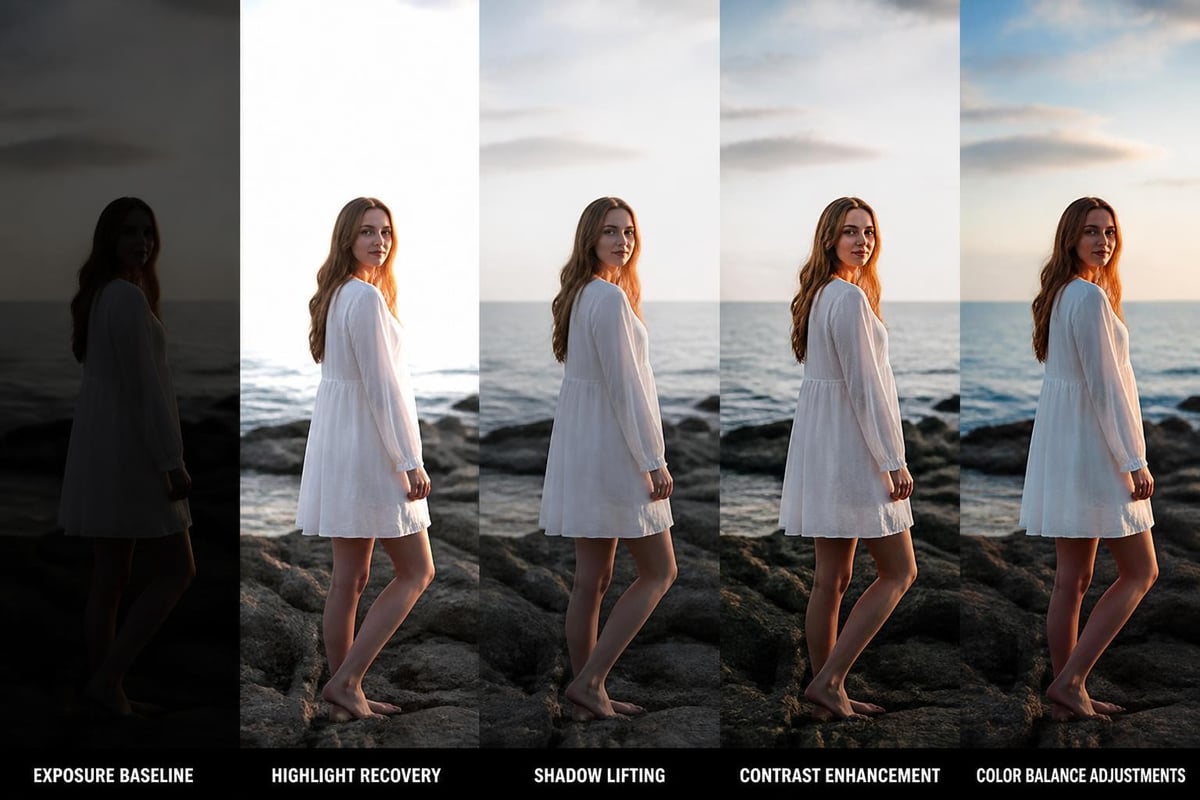
Exposure and Tonal Adjustments
Modern image editing provides granular control over tonal ranges:
| Adjustment | Purpose | Typical Application |
|---|---|---|
| Exposure | Overall brightness | Correct underexposed or overexposed captures |
| Highlights | Brightest areas | Recover blown-out skies, reduce hot spots |
| Shadows | Darkest areas | Lift blocked shadows, reveal hidden detail |
| Whites/Blacks | Tonal endpoints | Set pure white and true black points for contrast |
| Contrast | Tonal separation | Add punch to flat images, reduce harsh lighting |
The TensorFlow image processing operations documentation illustrates how these adjustments work programmatically, revealing the mathematical transformations behind intuitive slider controls.
Start with global exposure to establish overall brightness, then refine specific tonal ranges. Many photographers over-process shadows, creating an unnaturally flat appearance. Preserve some shadow depth for dimensional realism.
Color Temperature and White Balance
Color casts from fluorescent office lighting, warm tungsten bulbs, or cool overcast skies rarely match how we remember scenes. White balance correction neutralizes these casts, making whites appear truly white and allowing other colors to render naturally.
For portraits specifically, skin tone accuracy proves critical. Even slight green or magenta shifts create unflattering results that viewers perceive as "wrong" even if they can't articulate why. When evaluating whether adjustments successfully make a picture better, check that skin appears natural under various display conditions.
Vibrance versus saturation represents an important distinction. Saturation intensifies all colors equally, often pushing skin tones into unnatural territory. Vibrance selectively boosts muted colors while protecting already-saturated tones, particularly skin, delivering more refined results.
Sharpness, Detail, and Noise Management
Perceived sharpness comes from contrast at edges where different tones meet. Understanding this principle helps you make a picture better without introducing harsh, over-sharpened artifacts.
Intelligent Sharpening Techniques
Apply sharpening selectively rather than globally. For portraits, sharpen eyes, eyelashes, hair strands, and jewelry while leaving skin relatively soft. Landscape photography typically benefits from overall sharpening with special attention to foreground elements.
The scikit-image library implements various sharpening algorithms, from basic unsharp mask to sophisticated edge-detection methods. Most consumer tools use simplified versions of these approaches:
- Unsharp mask: Creates halo around edges by subtracting blurred version from original
- High-pass sharpening: Isolates edge detail on separate layer for precise control
- Deconvolution: Attempts to reverse specific blur types (motion, defocus)
Sharpening amplifies both detail and noise, so noise reduction often precedes sharpening in professional workflows.
Noise Reduction Without Detail Loss
Digital noise manifests as random brightness (luminance noise) and color (chrominance noise) variations, particularly in shadows and in images shot at high ISO settings. Aggressive noise reduction creates smooth, plastic-looking results that eliminate textural detail you want to preserve.
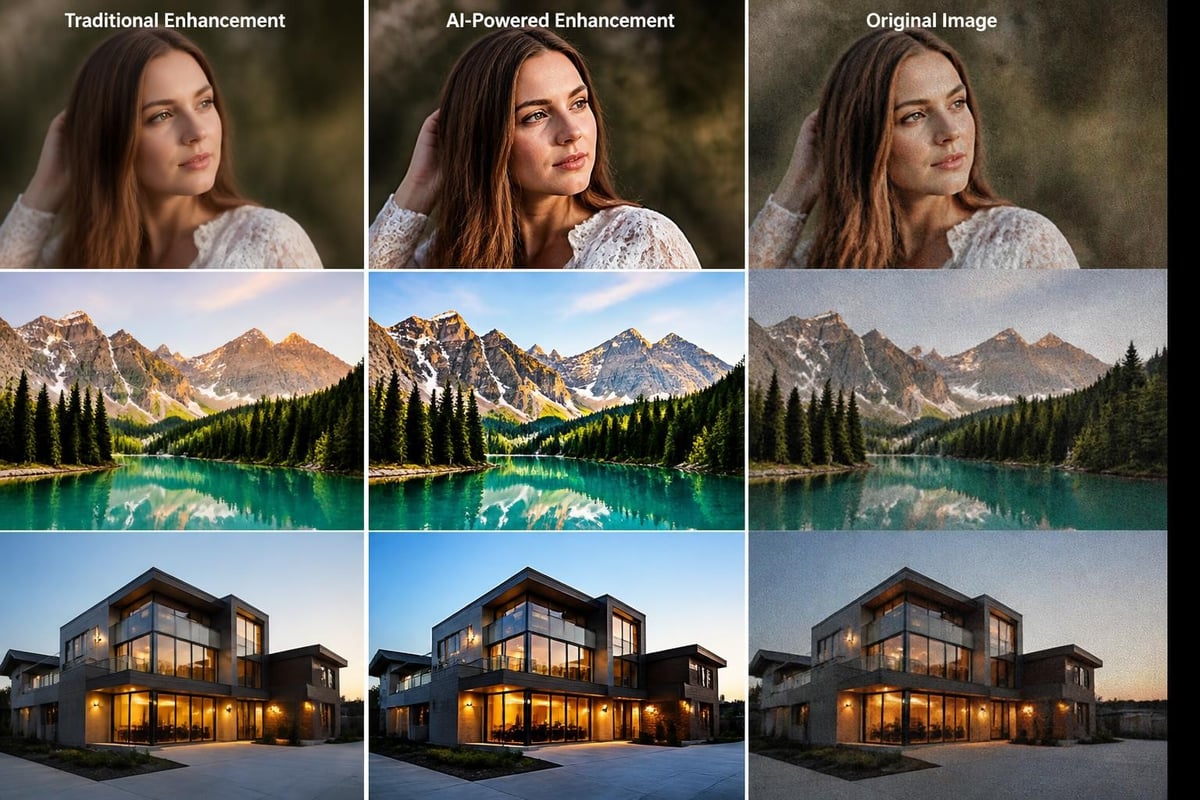
Modern AI-powered noise reduction analyzes local image content to distinguish genuine detail from random noise. These diffusion-based approaches trained on paired noisy and clean images achieve results impossible with traditional filters.
Balance noise reduction against detail preservation by:
- Applying stronger reduction to color noise (less perceptually important) than luminance noise
- Protecting edge detail through masking or algorithm parameters
- Accepting some remaining grain in shadows rather than creating unrealistic smoothness
- Evaluating results at actual viewing size, not at 100% magnification
AI-Powered Enhancement and Upscaling
Artificial intelligence has fundamentally changed what's possible when you make a picture better, moving beyond pixel manipulation to content-aware reconstruction.
Neural Upscaling and Super-Resolution
Traditional image enlargement interpolates between existing pixels, creating soft results that lack genuine detail. AI upscaling models trained on millions of high-resolution images reconstruct plausible detail that wasn't captured in the original photograph.
Real-world applications:
- Enlarging social media images for print without quality loss
- Recovering detail from compressed dating profile pictures
- Creating high-resolution outputs from smartphone captures
- Restoring old photographs scanned at insufficient resolution
The quality gap between AI and traditional upscaling becomes immediately apparent beyond 2× enlargement. Where bicubic interpolation produces mushy results, neural networks generate convincing texture, edge clarity, and fine detail.
Content-Aware Improvements
Modern enhancement tools analyze image content to apply appropriate corrections. Face detection enables automatic skin smoothing while preserving pores and natural texture. Sky recognition allows independent adjustment of exposure and color in skylines. Background segmentation permits selective focus effects previously requiring specialized camera equipment.
When choosing AI-generated photos or enhancement services, prioritize those that maintain your authentic appearance rather than applying heavy retouching. Your photos should look unmistakably like you when someone meets you in person-enhanced, but truthful.
Automated Versus Manual Enhancement Workflows
The decision between automated tools and manual editing depends on your goals, time constraints, and technical comfort level.
When One-Click Solutions Deliver
Automated enhancement excels for:
- Batch processing large photo sets requiring consistent treatment
- Quick social media posts where speed matters more than perfection
- Correcting obvious technical issues like underexposure or color casts
- Standardized outputs such as profile pictures requiring specific dimensions
Services like CMeIn leverage AI to generate realistic photos that maintain your likeness across various scenes and contexts. Rather than editing existing photos, these platforms create new images that look authentically like you in situations you want to showcase-dating profiles, professional headshots, travel scenarios. The technology focuses on composition and environmental context while keeping your face unchanged, delivering photos that feel genuine rather than retouched.
Manual Control for Nuanced Results
Invest time in manual editing when:
- Subtle refinements matter more than processing speed
- Creative vision requires specific aesthetic choices
- Problem areas need targeted correction automated tools miss
- Learning how adjustments affect your images improves future shooting
Professional photographers typically combine approaches, using automated corrections as starting points before manual refinement. The ImageMagick command-line tools allow scripting common adjustments while preserving flexibility for custom operations.
Platform-Specific Optimization
Different platforms impose unique requirements that influence how you should make a picture better for specific uses.
Social Media and Dating Apps
Each platform has technical specifications and cultural norms:
| Platform | Optimal Dimensions | Key Considerations |
|---|---|---|
| Instagram Feed | 1080×1080 (1:1) | Vibrant colors, strong composition, consistent aesthetic |
| Instagram Stories | 1080×1920 (9:16) | Vertical framing, text-safe zones, bold visual hierarchy |
| 400×400 (profile), 1584×396 (banner) | Professional appearance, appropriate context, clear facial features | |
| Tinder/Hinge | 640×640 minimum | Genuine appearance, variety of contexts, full-body and close-up mix |
Compression algorithms on these platforms degrade image quality, so upload at maximum supported resolution and slightly increase sharpness to compensate for processing losses. Understanding how to choose dating profile photos that authentically represent you involves both technical optimization and strategic selection.
Professional and Print Applications
Professional contexts demand higher standards:
- Headshots: Clean backgrounds, proper exposure on facial features, natural skin tones, professional attire
- Portfolio pieces: Maximum resolution, color accuracy, careful attention to fine detail
- Print output: Convert to appropriate color space (CMYK for offset printing), account for dot gain, provide bleed area
Professional headshot services can generate clean, studio-quality results from casual reference photos, maintaining your authentic appearance while meeting format requirements.
Common Enhancement Mistakes to Avoid
Knowing what not to do when you make a picture better prevents common pitfalls that undermine your efforts.
Over-Processing Red Flags
These signs indicate you've pushed adjustments too far:
- HDR halos: Bright outlines around subjects against skies indicate excessive shadow lifting or clarity
- Posterization: Smooth gradients show visible banding from extreme tonal adjustments
- Oversaturation: Colors appear artificially vibrant, particularly in skies and foliage
- Unnatural skin: Excessive smoothing creates plastic-looking texture or strange color shifts
- Excessive sharpening: Bright halos around edges or emphasized noise patterns
Step away from images you've been editing for extended periods. Fresh eyes reveal processing artifacts your adapted vision misses.
Authenticity Versus Enhancement
Enhancement should elevate your natural appearance, not create a different person. This distinction proves especially critical for dating profiles and professional headshots where you'll eventually meet people in person. Photos that over-promise create disappointment, while authentic images set appropriate expectations and attract compatible connections.
The philosophy behind pose adjustment illustrates this balance-improving how you're positioned within an existing photo rather than fabricating an unrealistic appearance.
Building Your Enhancement Workflow
Establishing a consistent process helps you make a picture better efficiently while maintaining quality standards.
Workflow Structure
Step-by-step enhancement sequence:
- Import and backup original files before any editing
- Evaluate and select images worth enhancement effort
- Apply global corrections (exposure, white balance, lens corrections)
- Refine composition through cropping and straightening
- Execute local adjustments (dodging, burning, selective sharpening)
- Review at actual size on multiple devices and backgrounds
- Export in appropriate formats for intended use
- Archive both originals and edited versions with clear naming
The OpenCV curriculum provides technical foundations for building custom enhancement pipelines if you're developing automated solutions.
Tool Selection and Learning Investment
Start with tools matching your current skill level and specific needs. Mobile apps like Snapseed and VSCO provide surprisingly capable editing on smartphones. Desktop applications from Adobe, Affinity, and Capture One offer professional-grade control. Open-source alternatives like GIMP and Darktable deliver powerful features without subscription costs.
Invest time learning one tool thoroughly rather than superficially sampling many options. Core concepts transfer between applications, but efficiency comes from keyboard shortcuts, presets, and workflow optimizations you develop through practice.
Making your pictures better combines technical understanding with aesthetic judgment, balancing enhancement against authenticity. The techniques outlined here-from fundamental composition adjustments to AI-powered reconstruction-provide pathways to elevate image quality while maintaining genuine representation. Whether you're refining existing photographs through editing or need fresh images that authentically capture you in new contexts, the right approach depends on your specific goals and timeline. CMeIn generates realistic photos that look exactly like you across various scenes-dating profiles, professional settings, travel moments-using your reference photos to create images that maintain your authentic likeness without artificial retouching, delivering photos that truly represent who you are.