Pic Make: Creating Realistic AI Photos That Look Like You

The ability to pic make authentic images that preserve your true likeness has transformed how people build visual identities across digital platforms. Traditional photography requires scheduling, travel, wardrobe changes, and significant expense, but modern AI technology now enables you to generate realistic photos that capture you in diverse settings without ever leaving home. This shift represents more than convenience; it addresses a fundamental challenge facing anyone who needs fresh, varied imagery for dating apps, professional networks, or social media while maintaining genuine visual authenticity.
Understanding the Technology Behind Pic Make Solutions
Modern pic make systems rely on diffusion models trained on millions of image-preference pairs to understand what makes a generated photo look real. The Pick-a-Pic dataset demonstrates how human preferences guide these models toward photorealistic outputs rather than stylized or obviously synthetic results. When you upload reference photos, the system analyzes facial geometry, skin texture, lighting patterns, and distinctive features to create a mathematical representation of your appearance.
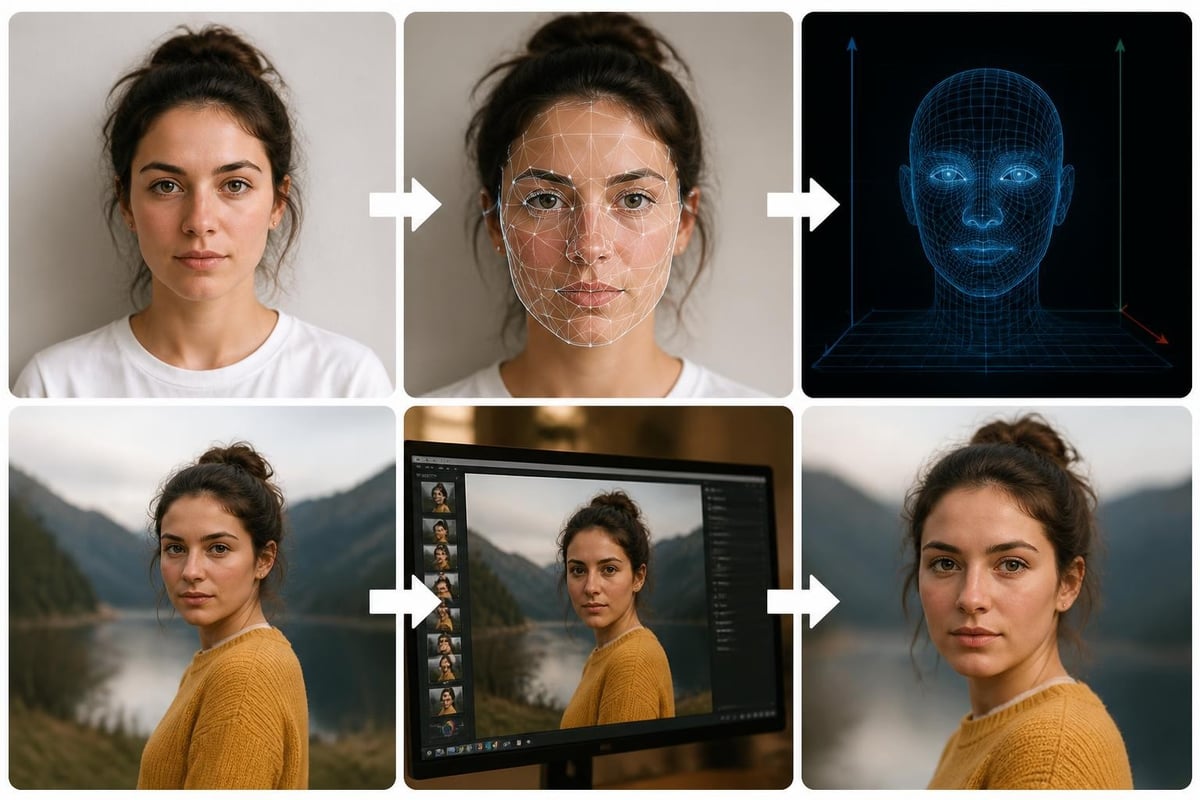
This embedding becomes the foundation for every generated image. Unlike filters or face-swap tools that distort proportions or add artificial smoothing, sophisticated pic make platforms maintain structural accuracy. Your bone structure, eye spacing, nose shape, and natural skin remain constant across generated scenes. The technology focuses on realistic composition rather than idealization.
Quality Assessment and Human Perception
The AGIQA-3K benchmark provides measurable standards for evaluating AI-generated image quality, examining alignment between prompts and outputs, perceptual authenticity, and artifact detection. When you pic make images for professional or personal use, quality matters beyond resolution. Subtle details like proper shadow direction, consistent lighting on facial features, and natural environmental interaction separate believable photos from obviously generated ones.
Key quality indicators include:
- Natural skin texture without over-smoothing or artificial glow
- Consistent lighting direction across face and environment
- Proper depth-of-field relationships between subject and background
- Realistic fabric draping and material properties in clothing
- Authentic color temperature matching scene context
Professional platforms test generated images against these benchmarks before delivery, ensuring outputs meet perception thresholds where viewers accept the photo as genuine.
Practical Applications for Generated Imagery
The decision to pic make photos rather than schedule traditional shoots stems from specific use cases where variety, convenience, and cost-effectiveness outweigh the need for in-person photography. Dating profile pictures represent the most common application, where users need 4-6 diverse images showing different contexts, outfits, and settings without staging multiple photoshoots.
Dating platforms prioritize visual variety. A profile with six coffee-shop selfies performs worse than one displaying weekend activities, travel moments, and social situations. Traditional photography requires organizing each setting separately, but pic make technology enables generating yourself hiking, at a gallery opening, or traveling internationally using only reference selfies taken at home.
Professional and Social Media Use Cases
| Application | Traditional Cost | Generated Alternative | Turnaround Time |
|---|---|---|---|
| Dating profile set | $300-500 photographer | Generated from selfies | Minutes vs. weeks |
| LinkedIn headshot | $150-300 studio session | Clean professional background | Instant vs. scheduling |
| Instagram travel content | Actual travel expenses | Realistic location composites | On-demand generation |
| Wardrobe testing | Purchase/rental costs | Virtual outfit changes | No physical items needed |
Beyond dating, professionals use pic make services for LinkedIn photos when their current headshots are outdated but they cannot justify photographer fees for a simple update. Social media managers generate seasonal content showing influencers in timely contexts without coordinating actual shoots. The technology serves anyone needing visual presence across platforms without proportional photography investment.
CMeIn transforms your reference photos into realistic AI-generated images that look like you in various scenes, giving you access to over 4,500 contexts from casual social settings to professional environments. This approach solves the variety problem while maintaining the authentic likeness that makes generated photos credible to viewers who know you personally.

Maintaining Authenticity in Generated Photos
The primary concern when using pic make technology centers on whether outputs actually resemble you or produce generic, idealized versions that lose individual characteristics. Early generation tools often smoothed distinctive features, altered facial proportions, or applied beauty-filter effects that created artificial-looking results. Modern systems preserve what makes your face recognizable precisely because authenticity performs better than idealization.
Research on AI-generated dating photos shows that heavily retouched or obviously artificial images generate lower match rates and conversation quality. Viewers develop sophisticated detection capabilities, and when photos don't match video calls or in-person meetings, trust deteriorates immediately. Platforms prioritizing likeness preservation over enhancement produce outputs that photograph credibly across contexts.
Technical Approaches to Preserving Likeness
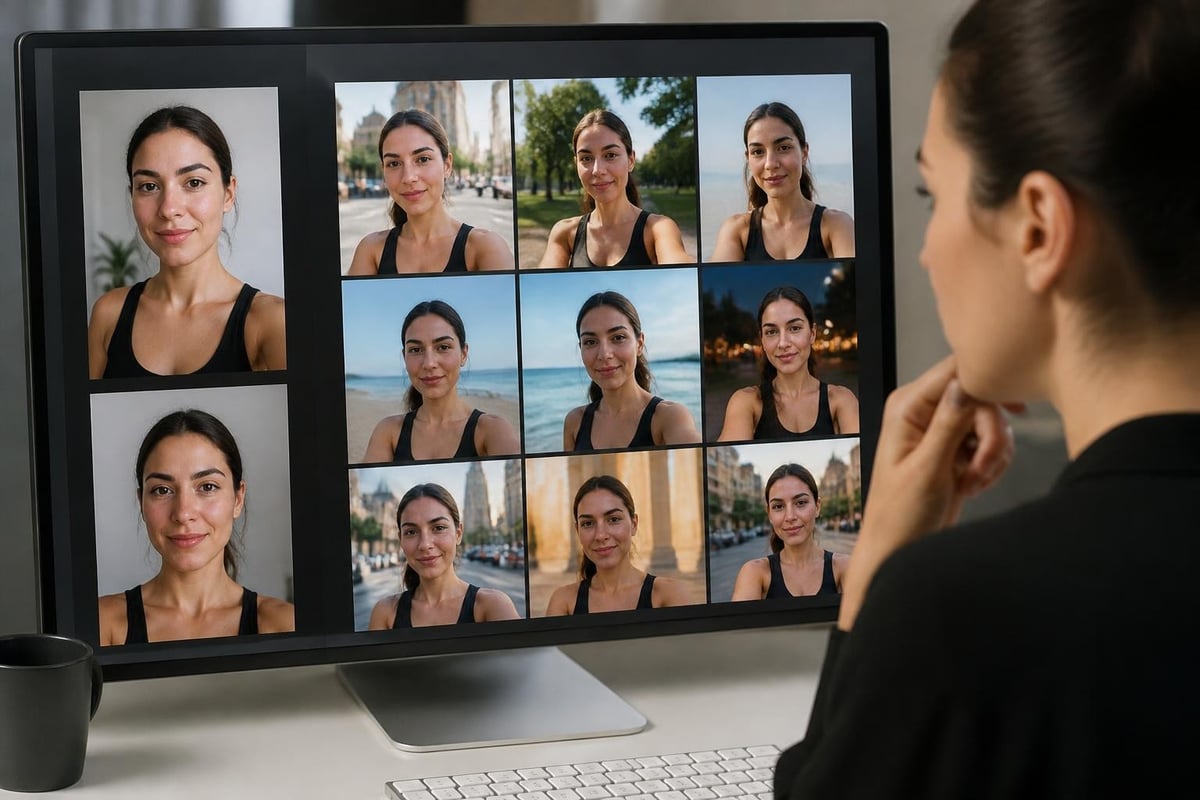
- Multi-angle reference collection - Systems analyze 8-12 photos showing different expressions, angles, and lighting to build comprehensive facial models
- Feature-locked generation - Key measurements like interpupillary distance and facial thirds remain mathematically constant across outputs
- Skin-texture preservation - Natural pores, freckles, and complexion characteristics transfer to generated images without artificial smoothing
- Expression consistency - Your natural smile mechanics and micro-expressions carry through to different scenes
When you pic make images with quality-focused platforms, you provide varied reference material showing your face under different conditions. The system identifies constant features appearing across all reference photos and locks these elements during generation. Variable factors like lighting, background, and outfit change while structural elements remain fixed.
Ethical and Transparency Considerations
UNESCO's guidance on AI ethics establishes principles for transparency, human oversight, and avoiding deceptive synthetic content. When you pic make images for dating, professional, or social purposes, disclosure expectations vary by context and jurisdiction. The EU AI Act mandates clear labeling of AI-generated content in specific commercial and public contexts.
For personal dating profiles, current platform policies generally permit AI-generated photos provided they accurately represent your current appearance. The ethical standard centers on truthfulness rather than production method. A generated photo showing you as you actually look today raises fewer concerns than a five-year-old professional photo showing a significantly different appearance.
Best practices for transparent use:
- Generate images matching your current age, weight, and overall appearance
- Avoid adding elements that don't reflect your actual life or capabilities
- Disclose generation if directly asked about photo origins
- Test generated images against video call appearance before profile use
- Update regularly as your appearance changes naturally
Professional contexts carry higher transparency expectations. NIST guidance on synthetic content recommends disclosure in contexts where viewers have reasonable expectations of traditional photography, such as journalism or legal documentation. LinkedIn headshots generated to match your current appearance occupy a middle ground, where the photo's function (representing how you look in professional settings) matters more than production method.
Watermarking and Provenance Technologies
Google's SynthID system embeds imperceptible watermarks in generated images, enabling later detection without visible quality impact. The Brookings analysis of AI fingerprints explores how these technologies balance transparency requirements with user experience. When you pic make photos through platforms implementing provenance systems, metadata records the generation process while leaving the visual content unmarked.
This approach satisfies regulatory transparency without stigmatizing individual users or making generated images immediately obvious to casual viewers. As detection tools become standard across platforms, the distinction between ethical use (accurate self-representation) and deceptive use (misrepresenting appearance or context) will rely more on output accuracy than generation disclosure.
Optimizing Your Reference Photos for Better Results
The quality of images you can pic make depends directly on reference photo quality. Systems trained on professional photography perform best when analyzing clear, well-lit reference material showing your face under optimal conditions. Poor reference inputs limit output quality regardless of underlying model capabilities.
| Reference Photo Quality | Impact on Generated Output | Recommended Fix |
|---|---|---|
| Blurry or low-resolution | Soft features, reduced detail | Use phone portrait mode, natural light |
| Harsh overhead lighting | Unflattering shadows transfer | Photograph near windows, diffused light |
| Extreme expressions | Limited neutral pose options | Include relaxed, natural expressions |
| Heavy makeup/filters | Artificial skin texture | Add filter-free, minimal makeup photos |
| Single angle only | Limited pose variety | Capture front, 3/4, and profile views |
Natural light from windows provides the most flattering and versatile illumination for reference photos. Stand three to six feet from a large window with indirect light (not direct sun) falling across your face. This creates soft shadows that define features without harsh lines. Take multiple photos with slight head turns, capturing straight-on, 45-degree, and profile angles.
Expression and Variety in Reference Sets
Include both smiling and neutral expressions in your reference collection. Many generated scenes work better with relaxed, natural expressions than broad smiles. If every reference photo shows you grinning, the system may struggle to pic make convincing images in contemplative or casual contexts where big smiles look out of place.
Wardrobe variety in references helps the system understand how your face appears in different style contexts. Include casual wear, business attire, and formal clothing so the model learns how your features interact with different necklines, collars, and color palettes. This variety translates to more convincing outputs across the 4,500+ scenes available in comprehensive platforms.
Privacy and Data Handling in Photo Generation
When you pic make images, you upload reference photos containing biometric data to third-party platforms. Understanding how these systems store, process, and delete your facial data protects both privacy and legal compliance. The PicMake open-source implementation demonstrates privacy-by-design approaches using localStorage and IndexedDB to keep data client-side, though commercial platforms typically require server-side processing for computational efficiency.
Key privacy considerations:
- Where reference photos are stored (encrypted cloud, temporary processing, local-only)
- How long facial embeddings persist after generation
- Whether data trains future models or remains isolated
- Deletion policies when you close your account
- Third-party access controls and sharing restrictions
Reputable platforms specify retention policies clearly, typically storing reference photos only during active use and deleting embeddings when you remove images or close your account. Review privacy policies before upload, particularly regarding model training. Some services reserve rights to use uploaded photos for improving their systems, while privacy-focused alternatives commit to isolated processing without data reuse.
European users benefit from GDPR protections requiring explicit consent for biometric processing and guaranteeing deletion rights. When you pic make photos through EU-compliant platforms, you retain legal control over your facial data regardless of where the company operates.
Scene Selection and Contextual Believability
The scenarios you choose when generating images determine whether outputs look authentic or obviously staged. When you pic make yourself in a marble palace library despite never sharing book-related content elsewhere in your profile, viewers notice the incongruence. Effective scene selection matches your actual lifestyle, interests, and the contexts where you genuinely appear.
Dating profiles perform best when generated images complement rather than contradict your bio and conversation style. If you describe yourself as outdoorsy, hiking and camping scenes reinforce that identity authentically. Generating yourself rock-climbing when you've never climbed creates cognitive dissonance during conversations when matches ask about your climbing experience.
Matching Scenes to Profile Context
- Review your bio for mentioned hobbies, activities, or interests
- Select scenes that visualize these elements naturally
- Include 1-2 aspirational contexts you're actively pursuing
- Avoid scenes implying skills or experiences you don't have
- Test whether you could naturally discuss the scene's activity
Professional headshots need simpler decisions. Clean backgrounds in neutral tones work universally, while specific office or industry contexts should match your actual work environment. Generating yourself in a medical setting when you work in finance creates confusion rather than credibility.

CMeIn's scene library organizes over 4,500 options by category, helping you pic make images across dating, professional, travel, and lifestyle contexts while maintaining the coherent visual identity that makes profiles credible. Browse categories matching your actual interests rather than selecting scenes based purely on aesthetic appeal.
Technical Implementation and Accessibility
The mechanics of how platforms let you pic make images affect both user experience and output quality. Interface design, processing time, customization options, and accessibility features determine whether generation feels straightforward or frustrating. Well-implemented systems guide scene selection, provide preview capabilities, and deliver outputs rapidly enough to support iterative refinement.
User experience factors:
- Upload limits and file size restrictions for reference photos
- Processing time from submission to downloadable output
- Preview or approval workflows before final generation
- Batch generation capabilities for profile sets
- Mobile versus desktop interface optimization
Most platforms generate individual images in 30-90 seconds, though batch processing multiple scenes simultaneously may extend timelines. Real-time preview isn't typically feasible due to computational requirements, but some services offer low-resolution previews before committing full processing resources.
Accessibility considerations apply when generated photos serve public-facing purposes. The W3C accessibility guidelines require meaningful alt text for images, describing not just that a photo shows a person but relevant context. When you pic make images for websites or professional portfolios, include descriptive alternative text for screen-reader users.
Comparing Generation Platforms and Service Models
Multiple platforms now offer pic make capabilities with varying approaches to pricing, scene libraries, quality standards, and customization depth. Evaluating services requires examining output authenticity, generation speed, cost structure, and whether the platform prioritizes enhancement or accuracy.
| Platform Type | Typical Cost | Scene Variety | Primary Focus | Best For |
|---|---|---|---|---|
| Dating-focused | $15-30/month | 500-5,000 contexts | Lifestyle variety | Profile building |
| Professional headshot | $25-50/session | Studio backgrounds | Corporate polish | LinkedIn updates |
| General portrait | $10-40/month | Moderate selection | Artistic style | Social media |
| Enhancement-focused | $20-35/month | Limited scenes | Idealization | Filtered aesthetic |
Platforms emphasizing likeness preservation over enhancement produce outputs that hold up to video verification and in-person meetings. Services marketing "perfect" or "flawless" results typically apply smoothing and feature alteration that undermines authenticity. When you pic make images for contexts where people will eventually see you directly, accuracy-focused platforms deliver better long-term results.
Free or low-cost services often limit scene selection, reduce resolution, or apply watermarks. Subscription models provide full access to scene libraries and unlimited generation, supporting the experimentation needed to find your most effective images. One-time session fees work well for specific needs like professional headshots but become expensive when building comprehensive dating profiles.
Iterative Refinement and Result Optimization
Rarely does the first attempt to pic make images produce perfect results across all chosen scenes. Some contexts may render more convincingly than others, lighting may not match your reference photos optimally, or expressions might not suit particular scenes. Treating generation as an iterative process rather than single-pass production improves final output quality significantly.
Refinement workflow:
- Generate initial test set across 8-10 varied scenes
- Identify which contexts render most believably
- Note specific issues (lighting, expression, composition)
- Adjust reference photos if problems persist across scenes
- Regenerate problematic contexts with modified inputs
- Compare multiple versions before selecting finals
Some scenes inherently work better than others for generated content. Outdoor settings with natural lighting tend to render more convincingly than complex indoor environments with multiple light sources. Simple compositions focusing on you without extensive environmental detail typically produce cleaner results than busy scenes with numerous background elements.
When particular scenes consistently produce unsatisfying results, the issue may stem from insufficient reference photos showing you in similar lighting or pose contexts. Adding new reference material matching the target scene's lighting conditions often resolves persistent problems when you pic make in challenging environments.
Maintaining Visual Consistency Across Platforms
When you generate images for use across dating apps, social media, and professional networks simultaneously, maintaining visual consistency prevents the disjointed appearance that signals artificial origin. Your face should look recognizably the same across a LinkedIn headshot, Tinder profile, and Instagram post, even though these contexts demand different styles and compositions.
Consistency factors include:
- Apparent age matching across all generated images
- Similar hair length and style across contexts
- Consistent eyewear choices (always glasses or never glasses)
- Matching facial hair status and grooming level
- Coordinated weight and fitness appearance
Generating yourself significantly heavier or lighter across different platforms creates obvious contradictions. Similarly, appearing clean-shaven in professional contexts but bearded in dating photos raises questions. When you pic make images for multiple purposes, establish baseline appearance parameters and maintain them across all outputs.
Seasonal and temporal consistency matters too. Generating summer beach photos to post in February while your other content shows winter activities creates timeline confusion. Plan generated content to match both your current appearance and the logical posting schedule across platforms.
The ability to pic make realistic, personalized images has fundamentally changed how individuals build visual presence across digital platforms, offering unprecedented variety and convenience without sacrificing authentic self-representation. Success hinges on choosing quality-focused platforms, providing strong reference material, selecting contextually appropriate scenes, and maintaining consistency across outputs. CMeIn addresses these requirements by generating photos that preserve your true likeness across thousands of scenes, enabling you to build compelling profiles and social presence without photoshoots or artificial enhancement. Upload your reference photos today to discover how realistic AI generation supports your digital identity while keeping you recognizably yourself.